Showing posts with label javascript. Show all posts

Friday, November 19, 2010

Scripting Luke with Javascript

For quite some time now, I have been looking for a good way to build scripts that (a) allow people to "look inside" Luke indexes on a remote machine, and (b) can be embedded in larger scripts which run automatically via cron.

My first attempt was to write Python scripts with PyLucene, but it ended up never getting used, because our ops team prefer bash, and because of the effort of installing PyLucene on the production Unix boxes. PyLucene development has picked up again recently, but there was quite a long period during which we were using Lucene 2.x and PyLucene was only available for Lucene 1.x, so probably it was not such a bad thing.

My next attempt was with Lucli, the Lucene-CLI tool - I added a bunch of functionality to it, including the ability to run "lucli macros" (you can find the code here if you are interested). That never caught on with our scripting folks, however, probably because of the added complexity of having to maintain additional ".lucli" macro files in the repository - the preferred approach seems to be to send the commands into Lucli with a here document and parse the results with awk. Since we were not using the extra functionality of the local Lucli, when the time came to upgrade to Lucene 3.x, we simply pointed to the new JARs and it was business as usual.

Nowadays, when I need to do quick one-off analysis/debugging of Lucene indexes, I just use Jython and copy-paste from one of my older scripts. Not too different from writing Java code (ie we don't get PyLucene's Pythonic interface) but slightly more concise and easier to run from the command-line.

When I need to "look inside" a Lucene index on a remote machine, I ssh in with the -X option, then run Luke against the index on the remote machine. This points the DISPLAY on the remote machine to that of my local machine, so Luke shows up on my computer. The sequence of commands goes like this:

1
2
3
sujit@cyclone:~$ ssh -X sujit@avalanche
sujit@avalache's password: xxxx
sujit@avalanche:~$ luke.sh -index /path/to/index -ro

However, I recently downloaded Luke 1.0.1, and discovered that it came with a Javascript scripting console. It also takes a -script /path/to/script.js parameter on its command line, which got me all excited about the possibility of merging requirements (a) and (b) above into a single tool, and running against a codebase that (historically at least) has been faithfully tracking Lucene releases. Here's a screenshot:

However, a little testing showed that all the -script parameter does run the script within Luke's Javascript console - intuitively, the behavior I was expecting was for Luke to run the script, dump the results to STDOUT, and exit. I have an Issue open on Luke's Issue Tracker - feel free to vote for it if you agree.

Assuming that the above expectation is reasonable, and at some point in the future the -script parameter will behave as I think it should, I set about trying to figure out what I could do with the Javascript console. Here are some of the operations that I would use the scripting interface for:

Operation Comment
count([query]) If no query string is supplied, should return the number of records in the index. If query string is supplied, then it should return the number of matched records.
search(query) Execute the search specified by the query, and return the results.
find(fieldname, fieldvalue) Reads the index sequentially, returning documents where fieldname = fieldvalue.
get(docid) Return the document by docId
terms([fieldname]) Returns a map of all field names and their counts if no field name is specified. If fieldname is specified, then returns only the counts for this field name.

Javascript is not my favorite scripting language, and neither am I very good at it, but since it appears to be quite popular as an embedded scripting engine for Java-based apps (Alfresco and now Luke), I figured it was worth learning, and this would be a good opportunity. Here are the Javascript functions corresponding to the operations listed above. The ones prepended with an underscore are "private" functions used by the "public" (ie corresponding to an operation) functions..

  1
  2
  3
  4
  5
  6
  7
  8
  9
 10
 11
 12
 13
 14
 15
 16
 17
 18
 19
 20
 21
 22
 23
 24
 25
 26
 27
 28
 29
 30
 31
 32
 33
 34
 35
 36
 37
 38
 39
 40
 41
 42
 43
 44
 45
 46
 47
 48
 49
 50
 51
 52
 53
 54
 55
 56
 57
 58
 59
 60
 61
 62
 63
 64
 65
 66
 67
 68
 69
 70
 71
 72
 73
 74
 75
 76
 77
 78
 79
 80
 81
 82
 83
 84
 85
 86
 87
 88
 89
 90
 91
 92
 93
 94
 95
 96
 97
 98
 99
100
101
102
103
104
105
106
107
108
109
110
111
112
113
function _is_undefined(value) {
  return typeof(value) === "undefined";
}

function _get_query(q) {
  var analyzer = 
    new Packages.org.apache.lucene.analysis.standard.StandardAnalyzer(
    app.getLuceneVersion());
  var parser = new Packages.org.apache.lucene.queryParser.QueryParser(
    app.getLuceneVersion(), "f", analyzer);
  return parser.parse(q);
}

function count() {
  print("count:" + ir.numDocs());
}

function count(q) {
  var searcher = new Packages.org.apache.lucene.search.IndexSearcher(ir);
  var query = _get_query(q);
  var hits = searcher.search(query, 100).scoreDocs;
  print("count(" + q + "):" + hits.length);
}

function search(q) {
  var searcher = new Packages.org.apache.lucene.search.IndexSearcher(ir);
  var query = _get_query(q);
  var hits = searcher.search(query, 100).scoreDocs;
  for (var i = 0; i < hits.length; i++) {
    get(hits[i].doc, hits[i].score);
  }
  searcher.close();
}

function find(key, val) {
  var numDocs = ir.numDocs();
  for (var i = 0; i < numDocs; i++) {
    var doc = ir.document(i);
    var docval = String(doc.get(key));
    if (docval == null) {
      continue;
    }
    if (val == docval) {
      get(i);
    }
  }
}

function get(docId, score) {
  if (_is_undefined(score)) {
    print("-- docId: " + docId + " --");
  } else {
    print("-- docId:" + docId + " (score:" + score + ") --");
  }
  var doc = ir.document(docId);
  var fields = doc.getFields();
  for (var i = 0; i < fields.size(); i++) {
    var field = fields.get(i);
    var fieldname = field.name();
    print(fieldname + ":" + doc.get(fieldname));
  }
}

function terms(fieldname) {
  var te = ir.terms();
  var termDict = {};
  while (te.next()) {
    var fldname = te.term().field();
    if (_is_undefined(termDict[fldname])) {
      termDict[fldname] = 1;
    } else {
      termDict[fldname] = termDict[fldname] + 1;
    }
  }
  if (fieldname == "") {
    var sortable = [];
    for (var key in termDict) {
      sortable.push([key, termDict[key]]);
    }
    var sortedTermDict = sortable.sort(function(a,b) { return b[1] - a[1]; });
    for (var i = 0; i < sortedTermDict.length; i++) {
      print(sortedTermDict[i][0] + ":" + sortedTermDict[i][1]);
    }
  } else {
    if (_is_undefined(termDict[fieldname])) {
      print("Field not found:" + fieldname);
    } else {
      print(fieldname + ":" + termDict[fieldname]);
    }
  }
}

// unit tests
print("#-docs in index");
count();
print("#-docs for title:bone");
count("title:bone");

print("Search for title:bone");
search("title:bone");

print("get doc 0");
get(0);

print("Find record with title: Broken bone");
find("title", "Broken bone");

print("printing all term counts");
terms("");
print("printing term counts for idx");
terms("idx");
print("printing term counts for non-existent field foo");
terms("foo");

The functions are pretty basic at the moment, I would want to be able to plug in custom analyzers and less frequently custom similarity implementations, and (even less frequently) custom sorts to the search function. But this can be easily accomplished by passing in extra parameters into the search function and a little bit of extra code.

I was unable to get a reference to the Version enum from within Javascript, so I had to add a new method getLuceneVersion() in Luke.java (so its now accessible as app.getLuceneVersion() from Javascript). It seems a reasonable thing to do since specific versions of Luke do track specific versions of Lucene. I added this method in and ran "ant dist" to rebuild the JARs so my shell script (see below) could find it.

1
2
3
  public Version getLuceneVersion() {
    return Version.LUCENE_30;
  }

To call Luke, I created a luke.sh file in luke-1.0.1 bin subdirectory.

 1
 2
 3
 4
 5
 6
 7
 8
 9
10
11
12
13
14
15
16
17
18
19
20
21
22
23
24
25
26
27
28
#!/bin/bash
# Source: Downloads/luke-1.0.1/bin/luke.sh
BASEDIR=/Users/sujit/Downloads/luke-1.0.1
export CLASS_PATH=\
$BASEDIR/lib/hadoop/commons-cli-1.2.jar:\
$BASEDIR/lib/hadoop/commons-codec-1.3.jar:\
$BASEDIR/lib/hadoop/commons-httpclient-3.0.1.jar:\
$BASEDIR/lib/hadoop/commons-logging-1.0.4.jar:\
$BASEDIR/lib/hadoop/commons-logging-api-1.0.4.jar:\
$BASEDIR/lib/hadoop/commons-net-1.4.1.jar:\
$BASEDIR/lib/hadoop/ehcache-1.6.0.jar:\
$BASEDIR/lib/hadoop/hadoop-0.20.2-core.jar:\
$BASEDIR/lib/hadoop/jets3t-0.6.1.jar:\
$BASEDIR/lib/hadoop/kfs-0.2.2.jar:\
$BASEDIR/lib/hadoop/log4j-1.2.15.jar:\
$BASEDIR/lib/hadoop/oro-2.0.8.jar:\
$BASEDIR/lib/hadoop/slf4j-api-1.4.3.jar:\
$BASEDIR/lib/hadoop/slf4j-log4j12-1.4.3.jar:\
$BASEDIR/lib/hadoop/xmlenc-0.52.jar:\
$BASEDIR/lib/js.jar:\
$BASEDIR/lib/lucene-analyzers-3.0.1.jar:\
$BASEDIR/lib/lucene-core-3.0.1.jar:\
$BASEDIR/lib/lucene-misc-3.0.1.jar:\
$BASEDIR/lib/lucene-queries-3.0.1.jar:\
$BASEDIR/lib/lucene-snowball-3.0.1.jar:\
$BASEDIR/lib/lucene-xml-query-parser-3.0.1.jar:\
$BASEDIR/dist/luke-1.0.1.jar
java -cp $CLASS_PATH org.getopt.luke.Luke $*

During development, I edited the functions inside a single test.js file outside Luke (the Javascript console does not have command history, so it is not the best place to do development). Then I call Luke once as follows:

1
sujit@cyclone:luke-1.0.1$ bin/luke.sh -index /path/to/index -ro

And then in the Javascript console, the full test.js file can be loaded up with a load("/path/to/test.js"); and it would run the whole thing.

For regular use, one could write a (bash, although I would prefer Python) script that takes the inputs such as path to index, query string, etc, as command line parameters, then creates a temporary file that imports the function definitions and builds and appends the function call to make (similar to my unit tests) at the end of this temporary file. It would then launch Luke with the -script option pointing to this temporary file, which would run the script, output its results to STDOUT, and exit. The script would then parse the output (for downstream use) or return it as-is.

Thinking about this some more, though, it does seem like a lot of work and a lot of complexity. The main advantage of this approach is that you can probably stick with bash scripting, delegating to Luke for the Lucene stuff. However, that aside, now that PyLucene is an official Apache Lucene subproject, and one can be reasonably certain that it too, will track Lucene releases as faithfully as Luke does, it may be time to just dust off the old PyLucene based Python scripts and keep things simple.

Saturday, December 06, 2008

The Properties Pattern and Functors

This week I have nothing to write about - I am in various stages of completion on multiple things I started, but none complete enough to post. Accordingly, in true blogging tradition, I do the next best thing - find someone else's blog, and comment on it, thereby creating a post of my own :-). This week's lucky winner is Steve Yegge's "The Universal Design Pattern" post. Granted, the post is long, but it is very interesting and informative - and entertaining. I strongly suggest you go read it first.

If you did as I suggested, you would know that Steve's Universal Design Pattern is the Properties Pattern, or an approach of modeling your object's data as Maps of name-value pairs instead of member variables. I was quite enamored with DynaBeans at one point, so much so that I built a very flexible (but somewhat difficult to maintain) content generation system around it, so this post was a major source of validation for me. I went with DynaBeans and DynaClasses because I wanted an inheritance structure, which I could not figure out how to model with maps at that time - Steve's post describes how to do this, with a special _parent key pointing to the Map that the current map extends.

So here is my take on the Properties Pattern. Each object has a Map of name-value pairs instead of traditional member variables and getters and setters. Instead, there is a get(String) and a set(String, Object) method which get and set the property named by the String argument. A get() will recursively climb the inheritance tree using the _parent key until it finds the value for the key before giving up and returning null.

I think it may be possible to take this one step further. If you look at a Prototype Ajax.Request call, it looks something like this. I choose Javascript because Javascript uses the Properties Pattern very extensively and this particular example illustrates that.

 1
 2
 3
 4
 5
 6
 7
 8
 9
10
11
12
13
14
15
16
  var request = new Ajax.Request(
    "/path/to/service/url",
    {
      method: 'get', 
      parameters: { 
        a : $F('a'),
        b : $F('b')
      }, 
      asynchronous: true,
      onLoading: function(transport) {
        // do something while the request is processing
      },
      onSuccess: function(transport) {
        // do something when the request is complete
      }
    });

In our example above, the second argument is a Map of name-value pairs. To our Properties Pattern enabled Java application object, this would like like a map with the keys {"parameters", "asynchronous", "onLoading", onSuccess"} with corresponding values hanging off them. All but the last two are simply data, but the last two are really function objects.

Although Java does not provide us ways to instantiate functions directly, we can still attach standard functor classes, such as a Transformer, from commons-collections. The onLoading and onSuccess methods are listeners that get invoked when the state of the enclosing object changes. To emulate that behavior, we could have a check to see if any of the "on*" methods should be invoked before we set the key in our set() call. Something like this:

 1
 2
 3
 4
 5
 6
 7
 8
 9
10
11
12
13
14
15
16
17
18
19
20
21
22
  private Map<String,Object>> map = new HashMap<String,Object>();
  ...
  public void set(String key, Object value) {
    for (String key : map.keySet()) {
      if (key.startsWith("on")) {
        // shouldFire is application or object specific
        if (shouldFire(key)) {
          Object value = fire(key, data);
          // if value is returned, do something specific with the value.
          // But most of the time (at least in the event handler case)
          // it would just be null.
        }
      }
    }
    map.put(key, value);
  }

  private Object fire(String eventName, Map<String,Object> data) {
    Transformer<Map<String,Object>,Object> handler = 
      (Transformer<Map<String,Object>,Object>) map.get(eventName);
    return handler.transform(data);
  }

It is quite possible that being able to set a function as a property may not be all that helpful, since the behavior of a prototype in most situations is directed through code -- the behavior may be slightly modifiable using data. Allowing functions to be specified in the property map means that the new instance may have completely different (overridden) behavior from its parent prototype. While this may not be the desired behavior in most cases, there can be situations, where you want to have different behavior in the child than in the parent, and being allowed to override or add functionality via function objects can be helpful.

The problem of serialization and user-friendliness can be tackled together by "allowing" the user to specify the functions as scripts in interpreted languages such as Jython or Javascript, which also run in the JVM through the ScriptEngine interface available since Java 6. Since they are scripts, they can be serialized and deserialized as text or JSON if needed.

Wednesday, July 09, 2008

Yahoo WebSearch API Javascript client using Dojo

In my last post, I described a Javascript client to display results from Google's JSON search service. In that, I used a PHP proxy to get around Javascript's Same Origin Policy. A cleaner remoting architecture called JSONP or Padded JSON, proposed by Bob Ippolito, and supported by most JSON web services, relies on the server being able to emit a JSON response wrapped in a client specified callback function.

To request padded JSON, the client would populate an optional query parameter which would contain the Javascript callback function name. The client code would implement the callback function. The implementation would typically parse the JSON response and construct HTML to populate into the innerHTML element of a div tag on the page displayed on the browser.

So when the query is sent to the server, the JSON response is wrapped inside the specified callback function name. For example, a query to the Yahoo WebSearchService API would look something like this:

1
2
3
http://search.yahooapis.com/WebSearchService/webSearch?query=foo&\
  callback=handleResponse&\
  appid=get-your-own-yahoo-id-and-stick-it-in-here

And the server will return a JSON response wrapped within the callback, which is executed as a Javascript function call.

1
  handleResponse(json_response_string);

So now if we defined a function handleResponse(String), then whatever is in the function will be executed.

I think this approach is quite beautiful (in the Beautiful Code sense) - not only does it exploit the macro expansion feature in interpreted languages in a clever yet intuitive way, it enables true serverless operation by getting around Javascript's Same Origin Policy.

Setting up the client to do dynamic calls is a bit of a pain with this approach though. Since we don't know the search term until its entered, so using plain Javascript involves manipulating the DOM tree to insert the call into a html/head/script element. However, there are a lot of Javascript frameworks around which make light of this work. One such framework is Dojo, which comes with both JSON and UI components.

In this post, I describe a client that I built using Dojo to run against Yahoo's WebSearch API to display search results from my blog. Dojo has a fairly steep learning curve, but it is very well-documented, and the resulting code is very easy to read and maintain. Here is the code (really an HTML page containing Javascript code):

 1
 2
 3
 4
 5
 6
 7
 8
 9
10
11
12
13
14
15
16
17
18
19
20
21
22
23
24
25
26
27
28
29
30
31
32
33
34
35
36
37
38
39
40
41
42
43
44
45
46
47
48
49
50
51
52
53
54
55
56
57
58
59
60
61
62
63
64
65
66
67
68
<?xml version="1.0" encoding="UTF-8"?>
<!DOCTYPE html PUBLIC "-//W3C//DTD XHTML 1.0 Transitional//EN" 
  "http://www.w3.org/TR/xhtml1/DTD/xhtml1-transitional.dtd">
<html xmlns="http://www.w3.org/1999/xhtml" xml:lang="en" lang="en">
  <head>
    <title>My Blog Search Widget</title>
    <meta http-equiv="content-type" content="text/html; charset=UTF-8" />
    <style type="text/css">
      @import http://o.aolcdn.com/dojo/1.0.0/dojo/resources/dojo.css;
      @import http://o.aolcdn.com/dojo/1.0.0/dijit/themes/tundra/tundra.css;
    </style>
    <script type="text/javascript" 
      src="http://o.aolcdn.com/dojo/1.0.0/dojo/dojo.xd.js" 
      djConfig="parseOnLoad: true"></script>
    <script type="text/javascript">
      dojo.require("dijit.form.Button");
      dojo.require("dojo.io.script");
    </script>
    <script type="text/javascript">
function handleResponse(data, ioArgs) {
  var html = '<b>Results ' +
    data.ResultSet.firstResultPosition + 
    '-' +
    data.ResultSet.totalResultsReturned +
    ' for term ' +
    dojo.byId('q').value + 
    ' of about ' +
    data.ResultSet.totalResultsAvailable +
    '</b><br/><br/>';
  dojo.forEach(data.ResultSet.Result, function(result) {
    html += '<b><a href=\"' + 
      result.Url + 
      '">' +
      result.Title + 
      '</a></b><br/>' +
      result.Summary + 
      '<br/><b>' +
      result.DisplayUrl +
      '</b><br/><br/>';
  }); 
  dojo.byId("results").innerHTML = html;
}
    </script>
  </head>
  <body class="tundra">
    <p>
    <b>Enter your query:</b>
    <input type="text" id="q" name="q"/>
    <button dojoType="dijit.form.Button" id="searchButton">Search!
      <script type="dojo/method" event="onClick">
        dojo.io.script.get({
          url: 'http://search.yahooapis.com/WebSearchService/V1/webSearch',
          content: {
            appid: 'get-your-own-appid-and-stick-it-in-here',
            query: dojo.byId('q').value,
            site: 'sujitpal.blogspot.com',
            output: 'json',
            callback: 'handleResponse'
          },
          callbackParamName: handleResponse
        });
      </script>
    </button>
    </p>
    <hr/>
    <div id="results"></div>
  </body>
</html>

And here is the obligatory screenshot:

Saturday, June 21, 2008

Searchmash Javascript client using Prototype

I haven't used Javascript for a while. The last time I used it actively, to consume JSON results (generated from local backend components) on a web page, was over three years ago, and even then, I would deliberately keep the Javascript side real simple, doing all the processing of the JSON in a server component and then just popping the formatted HTML output into the innerHTML of the div element on the web page. In my defense, this was before all these Javascript frameworks that wrap the XmlHttpRequest up into nice functions, and decent Javascript debuggers such as Firebug. So the Javascript was complicated enough without having to compose HTML from JSON at the browser side.

Lately, however, I have been thinking of ways clients can leverage our API (which returns RSS 2.0 XML results by default, but can return JSON results if requested with output=json on the query parameters). During the last two years, Javascript has become more popular, various frameworks have matured and debuggers have improved. So trying these tools out and getting a feel for them tools would not only update my skills to something approaching real-world Javascript programmers, but also allow me to apply the lessons learnt here, so I can advise clients on how they can use our API in different ways.

After I moved out of the Javascript-heavy project I mentioned earlier, others in our group continued to improve the application, and I kept hearing real good things about this (then new) Javascript framework called Prototype, which provided a nice set of functions that made Javascript coding easier and much more fun. So I decided to try out Prototype first, in order to make a Javascript based widget to return search results for my blog, using Searchmash (the apparently secret Google JSON API) as the search results provider.

The first problem I ran into was Javascript's same origin policy restriction. According to this, Javascript would not allow me to make calls on a remote server. The workaround for this is to set up a proxy on your own site that will forward the request over to the remote server and give back the results to the Javascript code as if it originated at the same server. This is explained in detail in this Yahoo Developer Howto article. Being averse to adding more code than is absolutely necessary, I tried enabling mod_proxy and then mod_rewrite on my local Lighttpd webserver, but was not successful, so I ended up using a custom PHP proxy adapted from the code in the Yahoo article. This is shown below.

 1
 2
 3
 4
 5
 6
 7
 8
 9
10
11
12
13
14
15
16
17
18
19
20
21
22
23
24
25
26
27
28
29
30
31
32
<?php
# searchmash-proxy.php
// Adapted from:
// PHP Proxy example for Yahoo! Web services. 
// Responds to both HTTP GET and POST requests (only GET for this one).
// Author: Jason Levitt
// December 7th, 2005
//

$url = 'http://www.searchmash.com/results/%query%+site:sujitpal.blogspot.com';

// Get the REST GET call from the AJAX application
$qt = $_GET['qt'];
$url = str_replace("%query%", $qt, $url);

// Open the Curl session
$session = curl_init($url);

// Don't return HTTP headers. Do return the contents of the call
curl_setopt($session, CURLOPT_HEADER, false);
curl_setopt($session, CURLOPT_RETURNTRANSFER, true);

// Make the call
$results = curl_exec($session);

// The web service returns JSON. Set the Content-Type appropriately
header("Content-Type: application/json");

echo $results;
curl_close($session);

?>

This proxy is called from the Javascript code. The search term is plugged into the URL, and the proxy builds the URL for the call to Searchmash, executes the request, resets the Content-Type of the request to "application/json" and spits out the text. To the Javascript code, it is as if this all happened when it called the PHP proxy. We did not need to change the Content-Type, but if we do, we can use Prototype's built-in text to JSON parsing functionality, otherwise we will have to eval(transport.responseText) ourself. The HTML page with embedded Javascript is shown below:

 1
 2
 3
 4
 5
 6
 7
 8
 9
10
11
12
13
14
15
16
17
18
19
20
21
22
23
24
25
26
27
28
29
30
31
32
33
34
35
36
37
38
39
40
41
42
43
44
45
46
47
48
49
50
51
52
53
54
55
56
57
58
59
60
61
62
63
64
65
<!DOCTYPE html PUBLIC "-//W3C//DTD XHTML 1.0 Transitional//EN" 
    "http://www.w3.org/TR/xhtml1/DTD/xhtml1-transitional.dtd">
<html xmlns="http://www.w3.org/1999/xhtml" xml:lang="en" lang="en">
  <head>
    <title>My Blog Search Widget</title>
    <meta http-equiv="content-type" content="text/html; charset=UTF-8" />
    <script type="text/javascript" 
      src="http://prototypejs.org/assets/2008/1/25/prototype-1.6.0.2.js"></script>
    <script type="text/javascript">
function BlogSearch() {
  var request = new Ajax.Request(
    "/searchmash-proxy.php",
    {
      method: 'get', 
      parameters: { 
        qt : $F('q'),
      }, 
      asynchronous: false,
      onLoading: function(transport) {
        var html = '<b><blink>Searching...Please wait</blink></b>';
        document.getElementById('results').innerHTML = html;
      },
      onSuccess: function(transport) {
        var json = transport.responseJSON;
        var estimatedCount = json.estimatedCount;
        var term = json.query.terms;
        var results = json.results;
        var html = '<b>Total hits: ' +
            json.estimatedCount +
            ' for term: </b>' + 
            json.query.terms + 
            '<br/><br/>';
        results.each(function(result) {
          html += '<b><a href="' + 
            result.url + 
            '">' +
            result.title + 
            '</b></a><br/>' +
            result.snippet +
            '<br/><b>' +
            result.displayUrl + 
            '&nbsp;' +
            '<a href="' +
            result.cachedUrl + 
            '">Cached</a></b><br/><br/>';
        });
        document.getElementById('results').innerHTML = html;
      }
    }
  );
}
    </script>
  </head>
  <body>
    <p>
    <b>Enter your query:</b>
    <input type="text" id="q" name="q"/>
    <input type="button" name="Search" value="Search!" 
      onclick="BlogSearch()"/>
    </p>
    <hr/>
    <b>Results</b><br/>
    <div id="results"></div>
  </body>
</html>

The "Search!" button has an onclick handler that calls the BlogSearch Javascript function. This will make the call to the proxy with the content of the text input element. While the proxy is returning results, the anonymous function associated with the onLoading event will be called (simply setting the results div element's innerHTML to a blinking message, and once the response is available, the anonymous function associated with the onSuccess event will be called. Inside the onSuccess method, each result is parsed by yet another anonymous function, wrapped in a Ruby-like results.each() iterator. Finally the composed HTML is set into the innerHTML property of the results div block.

I copy both these files to the document root of my Lighttpd server and navigate to the HTML file (http://localhost:81/search-blog.html) on my browser, then enter the term in the search box and hit the 'Search!' button. Search results for the term 'json' are shown below:

There are several things I liked about this approach. First, no more futzing with browser detection and using XmlHttpRequest or its Microsoft cousin XMLHTTP directly. Second, the use of nested anonymous functions that improves the readability of the code. And third, the use of nested JSON objects to pass arguments to the function.

However, I felt the documentation for Prototype was rather sketchy. It is possible that I feel this because my Javascript is rusty, but this is likely to be the case for any newbie. Its not that the documentation is bad, its actually very well structured (much like Javadocs), it is just aimed at experienced Javascript developers. It may be helpful to have more examples of actual usage in the docs, much like the PHP docs on the net.

Saturday, July 29, 2006

AJAX Component with DWR and Velocity

I have been meaning to give the DWR (Direct Web Remoting) AJAX toolkit a shot for some time now. I consider myself a first generation AJAX programmer (as someone who has used XmlHttpRequest), but since I dont know any of the newer AJAX toolkits such as Prototype and DOJO, I just dont get no respect from the hotshot AJAX types (that was a joke BTW). Apart from that, considering that any session remotely related to AJAX played to overflowing crowds in this year's JavaOne, this was something I should have looked at quite some time ago. But since I dont do too much front end development, this was not something I needed to know, so I let it slide. So I finally got around to looking at DWR, and in this article, I describe an AJAX component using DWR and Velocity that can be served up within a portal-style page.

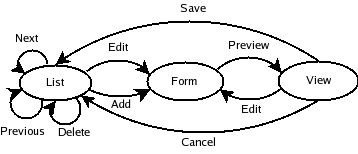
The component provides CRUD (Create, Retrieve, Update and Delete) functionality for a business object. The component is modelled as a state machine. The state diagram is shown below, where the nodes are views provided by the component, and the edges are the operations that are permitted on it.

DWR works by creating Javascript proxies for Java beans that are available to the servlet context. Methods can be called on the proxies in Javascript just as if they were regular Java objects. Each Javascript method call needs to provide an additional callback method parameter, which defines what to do with the result once it is available from the backend. This is because the calls are asynchronous (the A in AJAX) and the Javascript method call does not wait for the backend to respond. The callback method typically parses the return value of the method call and pops it into a span tag in the page.

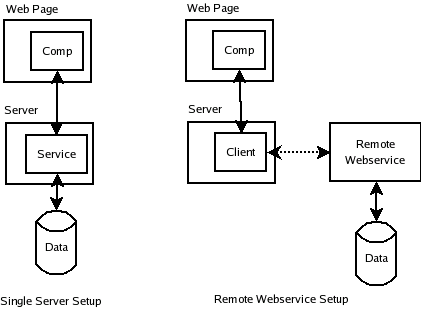
In the example, I have used a BookReview bean (since I had some test data from one of my previous projects) but this strategy can be extended to allow any object to be exposed. Also, in my example, the service that provides data to the state machine is a local JDBC service, but could just as well have been a client talking to a remote webservice to get data.

I used Spring for the MVC framework, integrating DWR with it based on the instructions in Bram Smeet's weblog, and the DWR-Spring integration page on the DWR site. Unlike Bram Smeet's example however, where he uses Javascript to pull apart the bean returned from the backend service and populate the span tag, I went with the approach of using Velocity templates on the server to create HTML snippets and return the HTML, which the callback function then popped into the span tag. You would probably guess that I am no hotshot Javascript coder (and you'll be right), but the reason for this is more than just to avoid writing Javascript. So the reasons are, in no particular order:

  • Avoid having to write any more Javascript than absolutely necessary.
  • It is easier to unit test at the Java layer than the Javascript layer.
  • Java has had better tool support than Javascript (although thats changing).
  • Ability to cache Velocity templates on the server for performance.

Why Velocity? Well, since we are bypassing the standard request-response cycle using DWR, I could not use JSPs, since JSPs need to have a pageContext populated by the controller at the end of the request-response cycle. The other option was to have generated the HTML directly in the service classes using System.out.println() calls, but that would have taken us back to the dark ages of web programming. Velocity templates provide a clean separation of the view from the model without forcing us to participate in the HTTP request-response cycle. In the case of the webservice setup, the templates can live on the front end application, and the component look and feel can be tweaked without any changes to the webservice client. Even in the case of the basic setup, having templates is more maintainable, since we can change the presentation without affecting the underlying service layer.

Configuration

The configuration is based on information in Bram Smeet's weblog and the DWR-Spring integration pages, so there is nothing new here, I am just including it in here for completeness. I list below the contents of the web.xml, dwr.xml and the Spring comp-servlet.xml.

 1
 2
 3
 4
 5
 6
 7
 8
 9
10
11
12
13
14
15
16
17
18
19
20
21
22
23
24
25
26
27
28
29
30
31
32
33
34
35
36
<!DOCTYPE web-app PUBLIC "-//Sun Microsystems, Inc.//DTD Web Application 2.3//EN" "http://java.sun.com/dtd/web-app_2_3.dtd" >
<!-- WEB-INF/web.xml -->

<web-app>
  <display-name>DWR/Velocity Component Test</display-name>

  <listener>
    <listener-class>org.springframework.web.context.ContextLoaderListener</listener-class>
  </listener>

  <servlet>
    <servlet-name>comp</servlet-name>
    <servlet-class>org.springframework.web.servlet.DispatcherServlet</servlet-class>
    <load-on-startup>1</load-on-startup>
  </servlet>

  <servlet>
    <servlet-name>dwr-invoker</servlet-name>
    <servlet-class>uk.ltd.getahead.dwr.DWRServlet</servlet-class>
    <init-param>
      <param-name>debug</param-name>
      <param-value>true</param-value>
    </init-param>
  </servlet>

  <servlet-mapping>
    <servlet-name>comp</servlet-name>
    <url-pattern>*.do</url-pattern>
  </servlet-mapping>

  <servlet-mapping>
    <servlet-name>dwr-invoker</servlet-name>
    <url-pattern>/dwr/*</url-pattern>
  </servlet-mapping>

</web-app>
 1
 2
 3
 4
 5
 6
 7
 8
 9
10
11
12
13
<!DOCTYPE dwr PUBLIC "-//GetAhead Limited//DTD Direct Web Remoting 1.0//EN" "http://www.getahead.ltd.uk/dwr/dwr10.dtd">
<!-- WEB-INF/dwr.xml -->
<dwr>
  <allow>
    <create creator="new" javascript="JDate">
      <param name="class" value="java.util.Date" />
    </create>
    <create creator="spring" javascript="BookReviewService">
      <param name="beanName" value="bookReviewService" />
      <param name="location" value="classpath:comp-servlet.xml" />
    </create>
  </allow>
</dwr>
 1
 2
 3
 4
 5
 6
 7
 8
 9
10
11
12
13
14
15
16
17
18
19
20
21
22
23
24
25
<?xml version="1.0" encoding="UTF-8"?>
<!DOCTYPE beans PUBLIC "-//SPRING//DTD BEAN//EN" "http://www.springframework.org/dtd/spring-beans.dtd" >
<!-- WEB-INF/comp-servlet.xml -->

  <bean id="dataSource" class="org.apache.commons.dbcp.BasicDataSource" destroy-method="close">
    <property name="driverClassName" value="com.mysql.jdbc.Driver" />
    <property name="url" value="jdbc:mysql://localhost:3306/bookshelfdb" />
    <property name="username" value="root" />
    <property name="password" value="mysql" />
  </bean>
   <bean id="bookReviewService" class="org.component.services.BookReviewService">
    <property name="dataSource" ref="dataSource" />
  </bean>
   <bean id="bookReviewController" class="org.component.controllers.BookReviewController">
  <property name="service" ref="bookReviewService" />
  </bean>
   <bean id="simpleUrlHandlerMapping" class="org.springframework.web.servlet.handler.SimpleUrlHandlerMapping">
    <property name="mappings">
      <props>
        <prop key="main.do">bookReviewController</prop>
      </props>
    </property>
  </bean>

</beans>

The Service

The code for the BookReviewService class is shown below. It consists of a set of public methods that the Javascript proxy can call, all of which return a String. The mergeContent() method takes a bean and a template name and renders the bean into the template. The BookReview bean is a simple JavaBean holder of properties, and the BookReviewCollection is a wrapper over a List<BookReview> which also contains the current page number and the total number of pages that can be displayed. In the interests of keeping this blog post to a manageable size, neither of these beans are shown, but they are trivial to implement.

  1
  2
  3
  4
  5
  6
  7
  8
  9
 10
 11
 12
 13
 14
 15
 16
 17
 18
 19
 20
 21
 22
 23
 24
 25
 26
 27
 28
 29
 30
 31
 32
 33
 34
 35
 36
 37
 38
 39
 40
 41
 42
 43
 44
 45
 46
 47
 48
 49
 50
 51
 52
 53
 54
 55
 56
 57
 58
 59
 60
 61
 62
 63
 64
 65
 66
 67
 68
 69
 70
 71
 72
 73
 74
 75
 76
 77
 78
 79
 80
 81
 82
 83
 84
 85
 86
 87
 88
 89
 90
 91
 92
 93
 94
 95
 96
 97
 98
 99
100
101
102
103
104
105
106
107
108
109
110
111
112
113
114
115
116
117
118
119
120
121
122
123
124
125
126
127
128
129
130
131
132
133
134
135
136
137
138
139
140
141
142
143
144
145
146
147
148
149
// BookReviewService.java
package org.component.services;

import java.io.StringWriter;
import java.util.List;
import java.util.Map;

import javax.sql.DataSource;

import org.apache.commons.lang.StringUtils;
import org.apache.log4j.Logger;
import org.apache.velocity.Template;
import org.apache.velocity.VelocityContext;
import org.apache.velocity.app.Velocity;
import org.component.beans.BookReview;
import org.component.beans.BookReviewCollection;
import org.springframework.jdbc.core.ColumnMapRowMapper;
import org.springframework.jdbc.core.JdbcTemplate;

public class BookReviewService {

    public static final String DEFAULT_ORDER_BY = "name";

    private static final Logger log = Logger.getLogger(BookReviewService.class);
    private static final int NUM_ROWS_PER_PAGE = 5;
    private static final String TEMPLATE_DIR = "src/main/resources/templates";

    private DataSource dataSource;

    public BookReviewService() {
        super();
    }

    public void setDataSource(DataSource dataSource) {
        this.dataSource = dataSource;
    }

    public String getAllReviews(int page, String orderBy, boolean isOrderAscending) {
        log.debug("getAllReviews(page=" + page + ", orderBy=" + orderBy + ", isOrderAscending=" + isOrderAscending + ")");
        return getAllReviewsAndMergeToTemplate(page, orderBy, isOrderAscending, "all_reviews");
    }

    public String getAllReviewsAndMergeToTemplate(int page, String orderBy, boolean isOrderAscending, String templateFile) {
        log.debug("getAllReviewsAndMergeToTemplate(page=" + page + ", orderBy=" + orderBy + ", isOrderAscending=" + isOrderAscending + ", templateFile=" + templateFile + ")");
        JdbcTemplate jt = new JdbcTemplate(dataSource);
        String limitStr = String.valueOf(page * NUM_ROWS_PER_PAGE) + "," + String.valueOf(NUM_ROWS_PER_PAGE);
        if (orderBy == null) {
            orderBy = "name";
        }
        List list = jt.queryForList(
            "select id, name, author, review from books order by " +
            (StringUtils.isEmpty(orderBy) ? DEFAULT_ORDER_BY : orderBy) +
            (isOrderAscending ? " ASC" : " DESC") +
            " limit " + limitStr, new Object[0]);
        BookReview[] reviews = new BookReview[list.size()];
        for (int i = 0; i < reviews.length; i++) {
            Map row = (Map) list.get(i);
            reviews[i] = new BookReview();
            reviews[i].setId((Long) row.get("id"));
            reviews[i].setBookTitle((String) row.get("name"));
            reviews[i].setReviewer((String) row.get("author"));
            reviews[i].setReviewText((String) row.get("review"));
        }
        int numReviews = jt.queryForInt("select count(*) from books");
        int lastPage = (int) Math.ceil((double) numReviews / NUM_ROWS_PER_PAGE);        BookReviewCollection collection = new BookReviewCollection();
        collection.setCurrentPage(page);
        collection.setLastPage(lastPage);
        collection.setReviews(reviews);
        return mergeContent(collection, templateFile);
    }

    public String getReview(int id) {
        log.debug("getReview(id=" + id + ")");
        BookReview review = getBookReview(id);
        return mergeContent(review, "single_review");
    }

    public String addOrEditReviewForm(int id, String bookTitle, String reviewer, String text) {
        log.debug("addOrEditReviewForm(id=" + id + ", bookTitle=" + bookTitle + ", reviewer=" + reviewer + ", text=" + text + ")");
        BookReview review = new BookReview();
        review.setId((long) id);
        review.setBookTitle(bookTitle);
        review.setReviewer(reviewer);
        review.setReviewText(text);
        return mergeContent(review, "add_edit_review");
    }

    public String previewReview(int id, String bookTitle, String reviewer, String text) {
        log.debug("previewReview(id=" + id + ", bookTitle=" + bookTitle + ", reviewer=" + reviewer + ", text=" + text + ")");
        BookReview review = new BookReview();
        review.setId((long) id);
        review.setBookTitle(bookTitle);
        review.setReviewer(reviewer);
        review.setReviewText(text);
        return mergeContent(review, "preview_review");
    }

    public String saveReview(int id, String bookTitle, String reviewer, String text) {
        log.debug("saveReview(id=" + id + ", bookTitle=" + bookTitle + ", reviewer=" + reviewer + ", text=" + text + ")");
        JdbcTemplate jt = new JdbcTemplate(dataSource);
        if (id == 0) {
            jt.update("insert into books (id, name, author, review) values (0, ?, ?, ?)",
                new Object[] {bookTitle, reviewer, text});
        }
        return getAllReviews(0, DEFAULT_ORDER_BY, true);
    }

    public String deleteReview(int id) {
        log.debug("deleteReview(id=" + id + ")");
        JdbcTemplate jt = new JdbcTemplate(dataSource);
        if (id != 0) {
            jt.update("delete from books where id=?", new Object[] {new Long(id)});
        }
        return getAllReviews(0, DEFAULT_ORDER_BY, true);
    }

    // for package access by test class
    protected BookReview getBookReview(int id) {
        BookReview review = new BookReview();
        if (id != 0) {
            JdbcTemplate jt = new JdbcTemplate(dataSource);
            Map row = (Map) jt.queryForObject("select id, name, author, review from books where id=?", new Object[] {id}, new ColumnMapRowMapper());
            review.setId((Long) row.get("id"));
            review.setBookTitle((String) row.get("name"));
            review.setReviewer((String) row.get("author"));
            review.setReviewText((String) row.get("review"));
        } else {
            review.setId(0L);
        }
        return review;
    }

    private String mergeContent(Object bean, String templateFile) {
        try {
            Velocity.init();
            VelocityContext vc = new VelocityContext();
            vc.put("bean", bean);
            Template t = Velocity.getTemplate(TEMPLATE_DIR + "/" + templateFile + ".vm");
            StringWriter writer = new StringWriter();
            t.merge(vc, writer);
            writer.flush();
            writer.close();
            return writer.getBuffer().toString();
        } catch (Exception e) {
            log.error("Error merging content", e);
            return "";
        }
    }
}

The Velocity Templates

The Velocity templates have a 1:1 correspondence with the nodes in our state diagram above. The main.vm template represents the component as it will first appear when the containing page is invoked. Notice the span tag named "component". This is where all the subsequent content pulled from method calls on the BookReviewService bean will be put.

 1
 2
 3
 4
 5
 6
 7
 8
 9
10
11
12
13
14
15
16
17
18
19
20
21
22
23
24
25
26
27
28
29
30
31
32
33
34
35
36
37
38
39
40
41
42
43
44
45
46
47
48
49
50
51
52
## main.vm
<!--
  test page: http://localhost:8080/smart-component/dwr/index.html
  this page: http://localhost:8080/smart-component/test.html
-->
<html>
  <head>
    <title>BookReviews</title>
    <script type="text/javascript" src="/smart-component/dwr/interface/BookReviewService.js"></script>
    <script type="text/javascript" src="/smart-component/dwr/engine.js"></script>
    <script type="text/javascript" src="/smart-component/dwr/util.js"></script>
  </head>
  <body>
    <script type="text/javascript">
    var callback = function(contents) {
        document.getElementById('component').innerHTML = contents;
    }
    </script>
    <span id="component">
      <table cellspacing="2" cellpadding="2" border="1">
        <tr>
          <td><b>Book Title</b></td>
          <td><b>Reviewer</b></td>
          <td><b>Review</b></td>
          <td><b>Edit</b></td>
          <td><b>Delete</b></td>
        </tr>
#foreach ($review in ${bean.reviews})
        <tr>
          <td>${review.bookTitle}</td>
          <td>${review.reviewer}</td>
          <td>${review.reviewText}</td>
          <td><input type="button" name="edit" value="Edit" onClick="BookReviewService.addOrEditReviewForm('${review.id}', '${review.bookTitle}', '${review.reviewer}', '${review.reviewText}', callback);" /></td>
          <td><input type="button" name="delete" value="Delete" onClick="BookReviewService.deleteReview('${review.id}', callback);" /></td>
        </tr>
#end
      </table>
      <input type="button" name="add" value="Add Review" onClick="BookReviewService.addOrEditReviewForm('0', '', '', '', callback);" />
      &nbsp;|
#if (${bean.currentPage} > 0 && ${bean.currentPage} < ${bean.lastPage})
#set ($prevPage = ${bean.currentPage} - 1)
      &nbsp;
      <input type="button" name="prevPage" value="Previous Page" onClick="BookReviewService.getAllReviews('${prevPage}', '', 'true', callback);" />
#end
#if (${bean.currentPage} == 0)
#set ($nextPage = ${bean.currentPage} + 1)
      &nbsp;
      <input type="button" name="nextPage" value="Next Page" onClick="BookReviewService.getAllReviews('${nextPage}', '', 'true', callback);" />
#end
    </span>
  </body>
</html>

The other pages are all_reviews.vm, add_edit_review.vm, single_review.vm and preview_review.vm. The all_reviews.vm contains the template for the list view, the add_edit_review.vm is the form template, and the single_review.vm and preview_review.vm are templates for the single book review view and the preview view (before saving). One thing to notice in the add_edit_review.vm is that it is not enclosed in a form tag. Enclosing the form in a form tag will make it do a request on submit, which we don't want.

 1
 2
 3
 4
 5
 6
 7
 8
 9
10
11
12
13
14
15
16
17
18
19
20
21
22
23
24
25
26
27
28
29
30
31
## all_reviews.vm
<table cellspacing="2" cellpadding="2" border="1">
  <tr>
    <td><b>Book Title</b></td>
    <td><b>Reviewer</b></td>
    <td><b>Review</b></td>
    <td><b>Edit</b></td>
    <td><b>Delete</b></td>
  </tr>
#foreach ($review in ${bean.reviews})
  <tr>
    <td>${review.bookTitle}</td>
    <td>${review.reviewer}</td>
    <td>${review.reviewText}</td>
    <td><input type="button" name="edit" value="Edit" onClick="BookReviewService.addOrEditReviewForm('${review.id}', '${review.bookTitle}', '${review.reviewer}', '${review.reviewText}', callback);" /></td>
    <td><input type="button" name="delete" value="Delete" onClick="BookReviewService.deleteReview('${review.id}', callback);" /></td>
  </tr>
#end
</table>
<input type="button" name="add" value="Add Review" onClick="BookReviewService.addOrEditReviewForm('0', '', '', '', callback)" />
&nbsp;|
#if (${bean.currentPage} > 0 && ${bean.currentPage} < ${bean.lastPage})
#set ($prevPage = ${bean.currentPage} - 1)
&nbsp;
<input type="button" name="prevPage" value="Previous Page" onClick="BookReviewService.getAllReviews('${prevPage}', '', 'true', callback);" />
#end
#if (${bean.currentPage} == 0)
#set ($nextPage = ${bean.currentPage} + 1)
&nbsp;
<input type="button" name="nextPage" value="Next Page" onClick="BookReviewService.getAllReviews('${nextPage}', '', 'true', callback)" />
#end
 1
 2
 3
 4
 5
 6
 7
 8
 9
10
11
12
13
14
15
16
17
18
19
## add_edit_review.vm
<input id="add_edit.id" type="hidden" name="id" value="$!{bean.id}" />
<table cellspacing="3" cellpadding="0" border="0">
  <tr>
    <td><b>Title:</b></td>
    <td><input id="add_edit.bookTitle" type="text" name="name" value="$!{bean.bookTitle}" /></td>
  </tr>
  <tr>
    <td><b>Your name:</b></td>
    <td><input id="add_edit.reviewer" type="text" name="author" value="$!{bean.reviewer}" /></td>
  </tr>
  <tr><td colspan="2"><b>Comment</td></tr>
  <tr>
    <td colspan="2"><textarea id="add_edit.reviewText" cols="80" rows="10" name="text">$!{bean.reviewText}</textarea></td>
  </tr>
</table>
<input type="button" name="preview" value="Preview" onClick="BookReviewService.previewReview(document.getElementById('add_edit.id').value, document.getElementById('add_edit.bookTitle').value, document.getElementById('add_edit.reviewer').value, document.getElementById('add_edit.reviewText').value, callback);" />
&nbsp;
<input type="button" name="cancel" value="Cancel" onClick="BookReviewService.getAllReviews('0', '', 'true', callback);" />
 1
 2
 3
 4
 5
 6
 7
 8
 9
10
11
12
13
14
15
## single_review.vm
<table>
  <tr>
    <td><b>Title:</b>&nbsp;${bean.bookTitle}</td>
  </tr>
  <tr>
    <td><b>Reviewed by:</b>&nbsp;${bean.reviewer}</td>
  </tr>
  <tr>
    <td><b>Review:</b>&nbsp;${bean.reviewText}</td>
  </tr>
</table>
<input type="button" name="edit" value="Edit" onClick="BookReviewService.addOrEditReviewForm('${bean.id}', '${bean.bookTitle}', '${bean.reviewer}', '${bean.reviewText}', callback);" />&nbsp;
<input type="button" name="delete" value="Delete" onClick="BookReviewService.deleteReview('${bean.id}', callback);" />&nbsp;
<input type="button" name="list" value="Back to List" onClick="BookReviewService.getAllReviews('0', '', 'true', callback);" />
 1
 2
 3
 4
 5
 6
 7
 8
 9
10
11
12
13
14
15
16
17
18
19
20
21
## preview_review.vm
<table>
  <tr>
    <td><b>Title:</b>
    <td>${bean.bookTitle}</td>
  </tr>
  <tr>
    <td><b>Reviewed by:</b>
    <td>${bean.reviewer}</td>
  </tr>
  <tr>
    <td colspan="2">${bean.reviewText}</td>
  </tr>
  <tr>
  </tr>
</table>
<input type="button" name="save" value="Save" onClick="BookReviewService.saveReview('${bean.id}', '${bean.bookTitle}', '${bean.reviewer}', '${bean.reviewText}', callback);" />
&nbsp;
<input type="button" name="edit" value="Edit" onClick="BookReviewService.addOrEditReviewForm('${bean.id}', '${bean.bookTitle}', '${bean.reviewer}', '${bean.reviewText}', callback);" />
&nbsp;
<input type="button" name="cancel" value="Cancel" onClick="BookReviewService.getAllReviews('0', '', 'true', callback);" />

Bootstrapping the Component

Since Javascript is event based, there has to be some event to start it up. I tried starting the list view with an onLoad event, but that was getting very confusing, since I could not populate the same span tag for all subsequent events. So I decided to bootstrap the component with a standard Spring Controller. So when you type this URL into your browser,

1
http://localhost:8080/comp/main.do

The main.vm template is used to provide an initial listing of BookReview objects in the database. The code for the Controller is straightforward, it just invokes the BookReviewService.getAllReviewsAndMergeToTemplate() method and writes directly to the ServletOutputStream.

 1
 2
 3
 4
 5
 6
 7
 8
 9
10
11
12
13
14
15
16
17
18
19
20
21
22
23
24
25
26
27
28
29
30
31
32
33
34
35
package org.component.controllers;

import java.io.OutputStream;

import javax.servlet.http.HttpServletRequest;
import javax.servlet.http.HttpServletResponse;

import org.apache.log4j.Logger;
import org.component.services.BookReviewService;
import org.springframework.web.servlet.ModelAndView;
import org.springframework.web.servlet.mvc.Controller;

public class BookReviewController implements Controller {

    private static final Logger log = Logger.getLogger(BookReviewController.class);

    private BookReviewService service;

    public BookReviewController() {
        super();
    }

    public void setService(BookReviewService service) {
        this.service = service;
    }

    public ModelAndView handleRequest(HttpServletRequest request, HttpServletResponse response) throws Exception {
        String htmlOutput = service.getAllReviewsAndMergeToTemplate(0, BookReviewService.DEFAULT_ORDER_BY, true, "main");
        OutputStream ostream = response.getOutputStream();
        ostream.write(htmlOutput.getBytes());
        ostream.flush();
        ostream.close();
        return null;
    }
}

Possible DWR Bug

I could not make method calls on onClick events on links work with DWR and Firefox 1.5. It looks like it may be a bug in DWR since the Javascript error message points to engine.js, a DWR supplied file. That is why the templates have so many buttons, since onClick events are triggered correctly if the link is replaced with a button. If anybody has made it work, please let me know.

Conclusion

The combination of Velocity templates to generate HTML on the server and DWR clients to consume it makes for very readable and maintainable code, compared to using XmlHttpRequest calls from Javascript. AJAX is definitely here to stay, and opens up lots of possibilities for partitioning application functionality.