Showing posts with label mvc. Show all posts

Saturday, December 22, 2007

Django : First Impressions

In my last post, I spoke of my experience with Pylons, a Python rapid web application development framework similar to Ruby on Rails, and drew parallels with popular Java frameworks I have used in my development work. An anonymous commenter expressed surprise at one of my comments where I said I considered TurboGears and Pylons top contenders in this space, and pointed out that Django has more people on its mailing lists and a longer list of deployed sites in production.

First off, let me say that I am no expert in Python frameworks. I happen to like the Python language, and use it for all my scripting work. I use Java for web development, and I picked up PHP again when I built a small application recently. However, I have admired Ruby on Rails for a while, but was too lazy to learn the Ruby language, so I was really looking for something similar in Python-land.

So anyway, when I looked at Django the last time around, I thought it looked kind of (too) optimized for developing database driven web applications. Also both TurboGears and Pylons leverage external projects for part of their functionality, so as a Java programmer, that approach appeared more attractive to me. However, I realize that I may have been kind of hasty in my comment, so I decided to download Django and run through the tutorial (which is a database driven app, but at least I would know more about it than I did when I wrote the comment.

The installation was completely painless. I downloaded the tarball for the latest official release (0.96.1) from the site, then ran

python setup.py install
to install it. I then followed a very informative 4 page tutorial to build a poll system with a MySQL backend. This includes a very pretty and functional admin interface, along with the user facing application itself. I won't bore you with the details, except to say that the tutorials are quite extensive and very detailed, and all the commands work as advertised.

Running

django-admin.py startproject ${project_name}
creates an empty project template for you. The template is sparser than a Rails project, it consists of just 4 files in the project directory. The manage.py is the super-script (similar to the Rails scripts in the scripts directory) that you will use to generate and run almost everything, which delegates to the manage.py program in Django's installation.

To run the application for development, Django provides a runserver subcommand for manage.py (

python manage.py runserver
) which instantiates a HTTP server at port 8000.

Application wide configuration is through a single settings.py file. Sub-applications in the webserver are stored as subdirectories, which are accessed through Django code as Python packages. Each such package can have its own settings.py file for configuring that package. To create a package, run the command

python manage.py startapp ${packagename}
, this will create a subdirectory with the skeleton code for models.py and views.py.

Django follows the MVC paradigm, however, the nomenclature used is somewhat different. Database tables are mapped directly to models in models.py, and the controller methods are declared in views.py. The actual views are in a template directory that is defined in settings.py. The templates contain HTML and markup in Django's custom templating language. So the MVC is actually MTV in Django.

Django's custom ORM is quite lean, and similar to SQLAlchemy in Pylons, and like RoR, has support for declaring and following 1:1, 1:n, and n:n relationships. Each database table is modelled as a class in the models.py file in the package directory. One sets up the database mappings in the settings.py file, then creates the model classes. Then we need to run

python manage.py syncdb
to create the tables in the database. However, I found the SQLAlchemy API more intuitive.

I particularly liked the Django shell, in which it is possible to interactively play with the models, adding and removing data, to see if everything works. It can be started with

python manage.py shell
at the command line.

The templating language is custom to Django. It contains most of the simple control structures you would expect. However, the impression I got is that the preferred way is to do as much processing as possible in the controller layer (methods in views.py), which is what I would prefer to do in any case.

Overall, I liked Django. It is very similar to RoR, probably more so than TurboGears and Pylons, in the sense that it is a custom full-stack application optimized for database-driven apps. Django's routing appears to be slightly more advanced since regular expressions can be used to specify patterns, but clean URLs can be constructed by both frameworks. Pylons generates a nicer directory structure and uses (in my mind at least) correct nomenclature; however, that is probably just a function of usage.

From browsing the net, it seems that there is a stronger following for Django than for Pylons. Comparisons between TurboGears (and by extension, Pylons, which is very similar) and Django seem to favor the latter. However, there seems to be a dedicated following for Pylons as well. I found both Pylons and Django to be equally effective for my purposes, although I found Pylons to be more Java like, and thus more intuitive. Both offer functionality similar to RoR, which is great news for Ruby-challenged Python programmers like me.

And to the anonymous commenter, thanks very much for pointing me to Django.

Monday, December 17, 2007

First Steps with Pylons

I have written previously about how impressed I was with Ruby on Rails (RoR) when I first came across it about a year or so ago. For me, it represented a shift in the way web applications were designed - rather than build an individual application from scratch, the framework generates a template which can be extended as needed for the given application. Obviously, convention over configuration is an important aspect of this approach, since the template code will expect to find files with the "right" name and in the "right" location.

However, I did not know the Ruby scripting language, and in spite of my best efforts, I haven't been able to muster up enough interest to take the time and learn it. For one, Maven 2.x offers a similar (although not as complete) functionality to build application archetypes, and since I mostly do Java web application development for a living, it seemed a better investment of my time to work with Maven2 and Java. Second, although RoR seems to have impressive mindshare among the web literati, my personal experience is that customers expect a mid to large scale apps to be in Java. They usually don't have an opinion about smaller scale (3-10 page) apps, but I find PHP far simpler, more natural, and more than up to the task for building one of these. So there is not enough incentive for me to learn a language in order to use a framework that I will hardly ever use.

However, PHP uses the "code-in-page" approach, which is not easy to maintain once the application grows beyond a certain size. What I needed was a MVC framework based on a scripting language I already knew and enjoyed working in. Happily, when looking recently, I found not one, but three popular open source MVC frameworks based on Python - Django, TurboGears and Pylons.

Of these, TurboGears and Pylons are more glue-like, assembling the framework from a variety of other open source sub-frameworks. It is also possible to switch out some of the sub-frameworks and replace it with another if its a better fit for the application or the programming environment.

I started playing with TurboGears, since that is the more mature (and more stable, I hoped) framework of the two. Unfortunately, I could not get tg-admin to build my application template, because there were some modules mismatches with Python 2.5. After spending an afternoon trying to debug the problem, I gave up and tried Pylons. Installation was a breeze, partly because I already had some of the components installed for TurboGears, but there were absolutely no surprises, and everything worked as expected. I was able to get through the Getting Started (a Hello World style web application) and the Quick Wiki Tutorials within the next couple of days.

As I mentioned above, Pylons is composed of a number of sub-frameworks, each of which are independent projects in their own right. The Paster component provides commands to build an application template, similar to Maven2's archetype:create command, and to deploy the application as a Python egg (similar to WAR files in Java web applications). It also provides a built in HTTP webserver to test the application, similar to Maven2's Jetty plugin.

For database access, Pylons uses the SQLAlchemy project, which provides a Hibernate like API to access database tables and rows as Python objects. These are called model objects in Pylons. Each table (or logical group of tables) is modelled as a Python class. The SQLAlchemy engine is injected into the environment using a Python call in environment.py. The engine exposes a Session object, similar to Hibernate, from which a Query object is extracted. Method calls on the Query object translate to SQL queries to the database. However, the caller only sees application objects. This approach works great when the application gets to decide the database schema, but would probably be slightly more difficult (although not impossible) when building an application against an existing database. In this respect, it has the same limitations as Hibernate. I still need to delve deeper into this though.

For the page rendering subsystem, Pylons uses the Mako templating framework. Mako templates have markup that seems to be a superset of JSTL-style tags and something like Velocity-style tags. The JSTL style tags work off predefined model objects which are injected by Pylons controllers. Personally, I think its a bit confusing to have two kinds of markup, but I guess it may have just evolved that way. Although I am still new to Pylons, I think this would be one of the candidate subsystems where I may be tempted to look for alternatives.

The controller subsystem is provided by Pylons itself, and it is all straight generated Python code. There is a provided BaseController object which all application controllers must extend. The structure of an application controller seems to be similar in style to a Spring MultiActionController, with each public method mapped to a URL pattern, and representing a user action.

To route user URLs to the appropriate controller method, Pylons uses the Routes project. The default routes are set up an in-memory Python dictionary data structure. Additional application specific mappings are added to this structure using additional map.connect() calls in routing.py. This approach appears to be more powerful than Spring XML configuration, in that it allows regular expressions as well. TurboGears uses @expose annotations within the controller methods to do this, which may or may not be better depending on your point of view.

Thus, for a Java programmer who has worked with Maven2, Spring and Hibernate, getting started with Pylons is likely to be quite easy, probably more so than RoR. Of course, it would help if you already knew some Python. I think the relative popularity of RoR among Java programmers is because a lot of them would list Perl as their favorite scripting language, and Perl to Ruby is not that much of a stretch. Perl used to my favorite scripting language at one point, but ever since I began to use Python, reading and writing Perl code is less fun than it used to be. Python is very Java like in a lot of respects, although it is much more concise.

I think that another reason for the relative obscurity of Python based MVC frameworks is the availability of too many choices. Given that Python's philosophy is that "there should be one — and preferably only one — obvious way to do it", I can see how multiple frameworks could be anathema to Python programmers. However, jokes apart, this does dilute the focus of any serious efforts at popularizing a framework. Unlike RoR, there is no one "right" way to do rapid MVC development in Python. However, this is changing, and the two top contenders (in my opinion) in this space are TurboGears and Pylons. The two are very similar, although each glues together different sets of sub-projects. As Ian Bicking states:

I'd have a hard time describing the technical differences (between TurboGears and Pylons) in a meaningful way to someone who didn't already know something about Python web development.
However, TurboGears 2.x will be based on Pylons, so soon Python web developers will have one uber MVC framework to work with, possibly composed of the best sub-projects from either framework. Of course, in keeping with the "glue" philosophy, I expect that the programmer would be able to switch a component out with another one in the same category if required.

Saturday, June 10, 2006

RoR style URLs with Spring MVC

One of the things that I find impressive about Ruby on Rails (RoR) is the simplicity of URLs used in RoR applications, and how they map back to the Controllers and View components. So in the RoR world, a URL of the form:

http://localhost:8080/app/entity/action/1234

means that the request would be forwarded by the web-application named "app" listening on port number 8080 on localhost to the Ruby EntityController class, which would then invoke the action() method on it with "1234" as an argument, then forward the request to the view component at app/entity/action.rhtml for presentation under the webserver's docroot.

This is, of course, both good and bad. It is good because it makes the application easier to understand and debug, both for the user and developer, and removes the need for some configuration, which can be a point of failure. It is bad for applications relying on security through obscurity, because malicious users can understand your application better too, so your application itself must be more security-concious for applications facing the outside world.

I have been thinking about how to do this using the Spring MVC framework, and it turns out to be quite simple. Here is how I did it. The flow in Spring is identical to the flow in RoR. However, I have changed the URL structure somewhat, to mimic what most Java developers and users are used to (including myself). So here is the new URL structure:

http://localhost:8080/app/entity/action.do?id=1234

would send the request to the DispatcherServlet configured in the "app" web application, which will forward it to the EntityController and call its action() method. The action() method would optionally consume the parameter id from the request. Lot of people associate the .do suffix with Struts, but I think its a nice convention to indicate that the URL points to some kind of Controller component, as opposed to static content indicated by .html, for example.

The DispatcherServlet is configured within the application's web.xml file. Currently, it is configured to respond to URLs ending with the .do suffix. The reference to the Spring Application Context, which contains references to beans that will be used by the DispatcherServlet, is set up by the ContextLoaderListener, as shown below:

 1
 2
 3
 4
 5
 6
 7
 8
 9
10
11
12
13
14
15
16
<web-app>
  <listener>
    <listener-class>org.springframework.web.context.ContextLoaderListener</listener-class>
  </listener>
                                                                                
  <servlet>
    <servlet-name>app</servlet-name>
    <servlet-class>org.springframework.web.servlet.DispatcherServlet</servlet-class>
    <load-on-startup>1</load-on-startup>
  </servlet>
  <servlet-mapping>
    <servlet-name>app</servlet-name>
    <url-pattern>*.do</url-pattern>
  </servlet-mapping>
                                                                                
</web-app>

The DispatcherServlet looks for a file called ${servlet.name}-servlet.xml (in our case app-servlet.xml), which typically contains references for the beans that the DispatcherServlet needs. I like to keep it in applicationContext-*.properties in my classpath WEB-INF/classes to make the application unit test friendly and include it from app-servlet.xml. There are three beans that really need to be customized to support RoR style URLs - the HandlerMapping to route the incoming URL, the MethodNameResolver to get the method name to invoke on the Controller which was routed to, and the ViewResolver to do the actual presentation. We also create an abstract class ActiveController which has some convenience method and extends the Spring MultiActionController, but that is just so as to enforce that all Controllers in such applications should be MultiActionControllers.

The HandlerMapping: ActiveControllerUrlHandlerMapping

This is a drop in replacement for standard handler mappings such as SimpleUrlHandlerMapping. Unlike the SimpleUrlHandlerMapping, which reads its mapping configuration once at startup, the ActiveControllerUrlHandlerMapping computes the controller, method and view names each time it is passed a request. It does this by parsing the request URI and pulling out the entity name and adding a "Controller" suffix. It will look this bean up in the ApplicationContext and complain if it cannot find it, so it is important to remember to configure each Controller according to the pattern ${entityName}Controller. Since it is parsing the URL anyway at this stage, it also computes and validates the method name and the view names to use, and sticks them into request attributes.

The requirement to have the Controller bean reference named in a certain way is not there in a RoR app, since it is an interpreted language, so a Controller and a Controller method becomes visible as soon as you drop the new code in the docroot. We could probably set this up to auto-detect a Controller as soon as it becomes visible in a certain package, but the approach would not be totally platform agnostic until Java comes out with a Package.getClasses() method.

The configuration for the handlerMapping looks like this:

1
2
3
4
  <bean id="handlerMapping" class="cnwk.prozac.utils.controllers.ActiveControllerUrlHandlerMapping">
     <property name="defaultHandler" ref="defaultHandler" />
   </bean>
  <bean id="defaultHandler" class="cnwk.prozac.utils.controllers.ActiveControllerDefaultHandler" /> 

Notice that there is no explicit URL pattern to controller mappings here. The defaultHandler is not strictly necessary, but can help to return user friendly results if the ActiveControllerUrlHandlerMapping does not find a valid controller or method to go to. In such cases, rather than throw a 404, it executes the ${defaultHandler}.info() method.

Heres the code for the ActiveControllerUrlHandlerMapping

  1
  2
  3
  4
  5
  6
  7
  8
  9
 10
 11
 12
 13
 14
 15
 16
 17
 18
 19
 20
 21
 22
 23
 24
 25
 26
 27
 28
 29
 30
 31
 32
 33
 34
 35
 36
 37
 38
 39
 40
 41
 42
 43
 44
 45
 46
 47
 48
 49
 50
 51
 52
 53
 54
 55
 56
 57
 58
 59
 60
 61
 62
 63
 64
 65
 66
 67
 68
 69
 70
 71
 72
 73
 74
 75
 76
 77
 78
 79
 80
 81
 82
 83
 84
 85
 86
 87
 88
 89
 90
 91
 92
 93
 94
 95
 96
 97
 98
 99
100
101
102
103
104
105
import java.lang.reflect.Method;
 
import javax.servlet.http.HttpServletRequest;
import javax.servlet.http.HttpServletResponse;
 
import org.apache.commons.beanutils.MethodUtils;
import org.apache.log4j.Logger;
import org.springframework.web.servlet.ModelAndView;
import org.springframework.web.servlet.handler.AbstractUrlHandlerMapping;
 
/**
 * Sets up mappings between the URL pattern and the corresponding Controller
 * beans. The convention for the URL is as follows:
 * <pre>
 * http://host:port/${webAppName}/${entityName}/${methodName}?(${arg}=${value})* * </pre>
 * If no controller bean is found in the application context, then the
 * lookupHandler method returns null.
 * The defaultHandler can be set as it is a property of AbstractHandlerMapping.
 */
public class ActiveControllerUrlHandlerMapping extends AbstractUrlHandlerMapping {
     
    private static final Logger log = Logger.getLogger(ActiveControllerUrlHandlerMapping.class);
     
    public ActiveControllerUrlHandlerMapping() {
        super();
    }
 
    /**
     * Returns a configured ActiveController bean that the URL resolves to.
     * If the URL is malformed, or the ActiveController for the specified URL
     * is not configured, or if the handling method is not available in the
     * resolved ActiveController instance, the ActiveControllerDefaultHandler
     * is returned, with the appropriate error message in the request attribute.     
     * @param request the HttpServletRequest object.
     * @return the ActiveController for this request.
     */
    @Override
    protected Object getHandlerInternal(HttpServletRequest request) {
        String urlPath = request.getRequestURI();
        String[] entityAndMethod = parseEntityAndMethodNamesFromUrl(urlPath);
        if (entityAndMethod[0] == null && entityAndMethod[1] == null) {
            request.setAttribute(ActiveController.ATTR_ERROR_MESSAGE,
                "Malformed URL:[" + urlPath + "], must be of the form " +
                "/${webapp}/${entity}/${method}?[${arg}=${value}&...]");
            return null;
        }
        String requestedController = entityAndMethod[0] + "Controller";
        Object handler = getApplicationContext().getBean(requestedController);
        if (handler == null) {
            request.setAttribute(ActiveController.ATTR_ERROR_MESSAGE,
                "The ActiveController instance " + requestedController + 
                " is not configured in the ApplicationContext");
            return null;
        } else if (!(handler instanceof ActiveController)) {
            request.setAttribute(ActiveController.ATTR_ERROR_MESSAGE,
                "The bean " + requestedController + " is not a ActiveController");
            return null;
        } else {
            Method requestedMethod = MethodUtils.getAccessibleMethod(
                handler.getClass(), entityAndMethod[1],
                new Class[] {HttpServletRequest.class, HttpServletResponse.class});
            if (requestedMethod == null) {
                request.setAttribute(ActiveController.ATTR_ERROR_MESSAGE,
                    "The method " + entityAndMethod[1] + 
                    "(HttpServletRequest, HttpServletResponse):ModelAndView is not defined in " + 
                    requestedController);
                return null;
            } else {
                String returnTypeClassName = requestedMethod.getReturnType().getName();
                if (!(ModelAndView.class.getName().equals(returnTypeClassName))) {
                    request.setAttribute(ActiveController.ATTR_ERROR_MESSAGE,
                        "The method " + entityAndMethod[1] + " has incorrect return type " + 
                        returnTypeClassName + 
                        ", should be org.springframework.web.servlet.ModelAndView, " +
                        "check your code");
                    return null;
                }
            }
        }
        request.setAttribute(ActiveController.ATTR_VIEW_NAME, entityAndMethod[0] + 
            "/" + entityAndMethod[1]);
        request.setAttribute(ActiveController.ATTR_METHOD_NAME, entityAndMethod[1]);
        return handler;
    }
     
    /**
     * Returns the entity and method names from the URL.
     * @param urlPath
     * @return
     */
    private String[] parseEntityAndMethodNamesFromUrl(String urlPath) {
        String[] parts = urlPath.split("[\\/|\\&]");
        if (parts.length < 4) {
            return new String[] {null, null};
        }
        String[] entityAndMethodNames = new String[2];
        entityAndMethodNames[0] = parts[2];
        if (parts[3].indexOf(".") > -1) { // remove any trailing suffix
            entityAndMethodNames[1] = parts[3].split("\\.")[0];
        } else {
            entityAndMethodNames[1] = parts[3];
        }
        return entityAndMethodNames;
    }
}

The MethodNameResolver: ActiveControllerMethodNameResolver

The ActiveControllerMethodNameResolver simply retrieves the value of the request attribute that was set by the HandlerMapping bean when it parsed and validated the incoming URL. If there was an error parsing the URL, the Spring framework will pass it off to the defaultHandler and the method attribute would be null in the incoming request. So all this bean does is to check if the method attribute is null, and if so, set it to the string "info".

Here is how it is configured:

1
  <bean id="methodNameResolver" class="cnwk.prozac.utils.controllers.ActiveControllerMethodNameResolver" />

and here is the code for the ActiveControllerMethodNameResolver

 1
 2
 3
 4
 5
 6
 7
 8
 9
10
11
12
13
14
15
16
17
18
19
20
21
22
23
24
25
26
27
28
29
30
31
32
33
import javax.servlet.http.HttpServletRequest;
 
import org.apache.commons.logging.Log;
import org.apache.commons.logging.LogFactory;
import org.springframework.web.servlet.mvc.multiaction.AbstractUrlMethodNameResolver;
import org.springframework.web.servlet.mvc.multiaction.MethodNameResolver;
import org.springframework.web.servlet.mvc.multiaction.NoSuchRequestHandlingMethodException;
 
/**
 * Resolves the method name for the specified controller. If the method does
 * not exist, then it returns an error.
 */
public class ActiveControllerMethodNameResolver implements MethodNameResolver {
     
    private static Log log = LogFactory.getLog(ActiveControllerMethodNameResolver.class);
     
    public ActiveControllerMethodNameResolver() {
        super();
    }
 
    /**
     * Returns the method name that will be executed.
     * @see org.springframework.web.servlet.mvc.multiaction.MethodNameResolver#getHandlerMethodName(javax.servlet.http.HttpServletRequest)
     */
    public String getHandlerMethodName(HttpServletRequest request) 
            throws NoSuchRequestHandlingMethodException {
        // check to see if its already populated by ActiveControllerUrlHandlerMapping
        String methodName = (String) request.getAttribute(ActiveController.ATTR_METHOD_NAME);
        if (methodName == null) {
            return "info";
        }
    }
}

The ViewResolver: InternalResourceViewResolver

For the ViewResolver, we just use one of the standard view resolvers provided with Spring. The HandlerMapping already populates the view name as ${entityName}/${methodName}, and the ViewResolver is configured with a prefix and suffix as shown below:

1
2
3
4
5
  <bean id="viewResolver" class="org.springframework.web.servlet.view.InternalResourceViewResolver">
    <property name="prefix" value="/" />
    <property name="suffix" value=".jsp" />
    <property name="viewClass" value="org.springframework.web.servlet.view.JstlView" />
  </bean>

So in this case, a view name of the form "person/list" would be resolved by the JSP file person/list.jsp under the web application's docroot.

The Controller superclass: ActiveController

Finally, since all our Controllers need to be MultiActionControllers to avail of this RoR style URL mappings, we enforce this by requiring that all our Controller subclass the ActiveController class. If they do not, the HandlerMapping would refuse to resolve the URLs. The ActiveController does provide one useful method getDefaultViewName() which pulls out the view name attribute off the request. Here is the configuration.

1
2
3
  <bean id="activeController" class="cnwk.prozac.utils.controllers.ActiveController">
    <property name="methodNameResolver" ref="methodNameResolver" />
  </bean>

Notice that it needs a reference to the methodNameResolver, which is our ActiveControllerMethodName resolver. The code is here:

 1
 2
 3
 4
 5
 6
 7
 8
 9
10
11
12
13
14
15
16
17
18
19
20
21
22
23
24
25
26
27
28
29
30
31
32
33
34
35
36
37
38
39
40
41
42
43
44
45
46
47
48
49
50
51
52
53
54
55
56
57
58
59
60
61
62
63
64
65
66
67
68
import javax.servlet.http.HttpServletRequest;
import javax.servlet.http.HttpServletResponse;
 
import org.apache.log4j.Logger;
import org.springframework.context.ApplicationContextException;
import org.springframework.web.servlet.ModelAndView;
import org.springframework.web.servlet.mvc.multiaction.MultiActionController;
 
/**
 * Base class for our RoR URL handling controllers.
 */
public class ActiveController extends MultiActionController {
 
    private final static Logger log = Logger.getLogger(ActiveController.class);
     
    public static final String ATTR_REQUEST_OBJECT = "_request";
    public static final String ATTR_ERROR_MESSAGE = "_error";
    public static final String ATTR_METHOD_NAME = "_methodName";
    public static final String ATTR_VIEW_NAME = "_viewName";
    public static final String DEFAULT_METHOD_NAME = "info";
     
    /**
     * Default ctor.
     * @throws ApplicationContextException if one is thrown.
     */
    public ActiveController() throws ApplicationContextException {
        super();
    }
 
    /**
     * Alternate ctor.
     * @param delegate the Object to delegate to.
     * @throws ApplicationContextException if one is thrown.
     */
    public ActiveController(Object delegate) throws ApplicationContextException {
        super(delegate);
    }
 
    /**
     * The default info() method which is called whenever a method cannot be
     * resolved. The info() method contains information about the URL sent, any
     * error messages, and (optionally) other information useful for debugging.
     * @param request a HttpServletRequest object.
     * @param response a HttpServletResponse object.
     * @return a ModelAndView
     * @throws Exception if one is thrown during processing.
     */
    public ModelAndView info(HttpServletRequest request, HttpServletResponse response) 
            throws Exception {
        ModelAndView mav = new ModelAndView();
        mav.addObject(ActiveController.ATTR_REQUEST_OBJECT, request);
        mav.setViewName(getDefaultViewName(request));
        return mav;
    }
     
    /**
     * Returns the method name from the request. The method name is populated
     * by the ActiveControllerUrlHandlerMapping. The method name is the view
     * name in our "convention over configuration" world. The exact mechanics
     * of view resolution (eg whether it goes to a JSP or a Tile) is controlled
     * by the ViewResolver class injected into the DispatcherServlet.
     * @param request the HttpServletRequest object.
     * @return the view name to forward to.
     */
    protected String getDefaultViewName(HttpServletRequest request) {
        return (String) request.getAttribute(ActiveController.ATTR_VIEW_NAME);
    }
}

Usage

Once the HandlerMapping, MethodNameResolver and the ViewResolver are configured, and these classes added to the system classpath, Controller classes will need to extend the ActiveController, and provide methods with the following signature:

public ModelAndView ${methodName}(HttpServletRequest request, 
  HttpServletResponse response) throws Exception;

and once the Controller class itself is configured as per the convention ${entityName}Controller, these methods would be automatically accessible to the web application at the URL /${webapp.name}/${entityName}/${methodName}.do.

In the course of doing some googling, I also found that the author of the blog MemeStorm has written an article here - Convention over Configuration in Spring MVC which describes an approach very similar to mine. It also contains many more articles on Spring MVC so its a good place to look for more insights about Spring.

Saturday, February 25, 2006

More Spring in Chains

Last week, I wrote about the Spring based Chained Controller to chain various controllers into a single request. This week, I provide some examples of its usage, and describe some modifications I made to it so as to make it easier to use.

Using a ThreadLocal to store shared context

In my original post, I had suggested using a the Spring BeanFactory as a ThreadLocal to store context between two controllers in a sequential chain so they can communicate. However, thinking about it some more, I figured that it would be friendlier to just provide a per-thread ChainedController context, so thats what I did. This involves a small modification in the original ChainedController code. We create a ThreadLocal as a private static member variable of the ChainedController, and provide public getters and setters. The variable declaration is shown below, the getContext() and setContext() methods follow the standard pattern:

1
2
3
4
5
private static ThreadLocal<Map<String,Object>> context = new ThreadLocal<Map<String,Object>>() {
    protected synchronized Map<String,Object> initialValue() {
        return new HashMap<String,Object>();
    }
};

To use it between two controllers A and B in a chain, A would set a variable into the context and B would retrieve it later and perform some decision based on the content of the variable:

 1
 2
 3
 4
 5
 6
 7
 8
 9
10
11
12
13
14
15
16
17
18
public class A implements Controller {
    public ModelAndView handleRequest(...) {
        ...
        Map<String,Object> chainCtx = ChainedController.getContext();
        chainCtx.put("someVariable", "someValue");
        ChainedController.setContext(chainCtx);
    }
}

public class B implements Controller {
    public ModelAndView handleRequest(...) {
        ...
        Map<String,Object> chainCtx = ChainedController.getContext();
        Object someVariable = chainCtx.get("someVariable");
        // do something with someVariable
        ...
    }
}

Obviously, the context is only meaningful when used in a sequential chain. By definition, controllers in a parallel chain should have no dependencies on each other, which implies that parallel chains can have no shared context.

Example of Extending a ChainedController

I had mentioned the possibility of extending a ChainedController to plug in any special processing that needs to be done, but in retrospect, I think it may just be better to extend the chain with another controller which contains the necessary logic to do this. However, here is an (admittedly contrived) example, in case you really need to do this. The example computes and prints the response time at the bottom of the generated page. To solve this problem using configuration alone, you will need to add two controllers to the chain, one to capture the start time, and another to capture the end time and compute the difference. Extending is much simpler in this case, as shown below:

 1
 2
 3
 4
 5
 6
 7
 8
 9
10
11
12
13
14
15
public class ResponseTimeReportingChainedController extends ChainedController {
                                                                                
    public ResponseTimeReportingChainedController() {
        super();
    }
                                                                                
    public ModelAndView handleRequest(HttpServletRequest request, HttpServletResponse response) throws Exception {
        StopWatch watch = new StopWatch();
        watch.start("response time");
        ModelAndView mav = super.handleRequest(request, response);
        watch.stop();
        mav.addObject("responseTime", watch.getTotalTimeMillis());
        return mav;
    }
}

The change to configure this controller instead of a ChainedController is to simply replace the class attribute for the controller in the Spring BeanFactory.

Bug in CallableController

I also discovered a bug in the CallableController inner class. The constructor signature took the HttpServletRequest and HttpServletResponse, but I was not passing them in. I did not notice the bug because my test case did not have to use the request for anything, but when I wrote the example of extending the ChainedController, I did, which exposed the problem. So the constructor for the CallableController will change to:

 1
 2
 3
 4
 5
 6
 7
 8
 9
10
private class CallableController implements Callable<ModelAndView> {
    ...
    public CallableController(Controller controller, HttpServletRequest request, HttpServletResponse response) {
        this.controller = controller;
        // the following two lines need to be added.
        this.request = request;
        this.response = response;
    }
    ...
}

Son of Spring in Chains - the DesignView

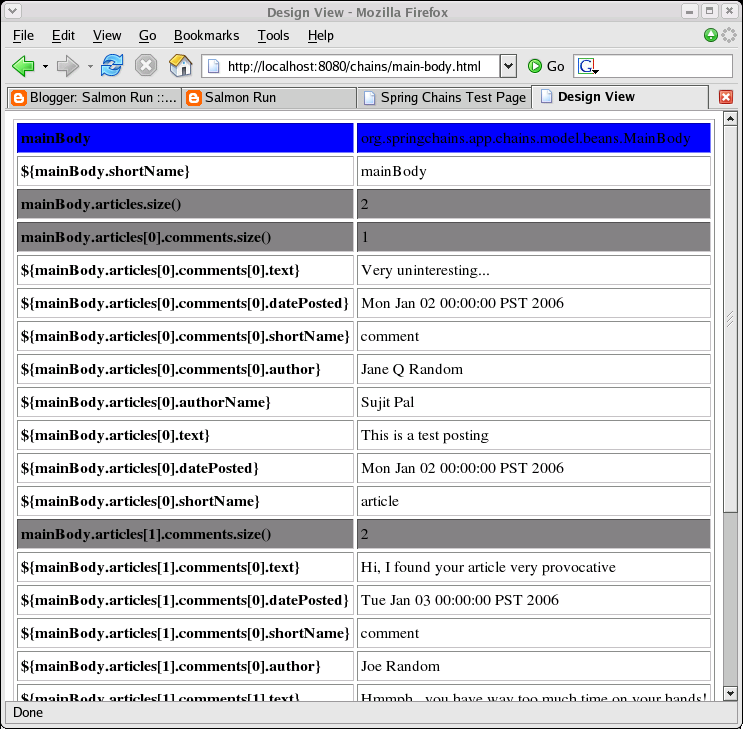
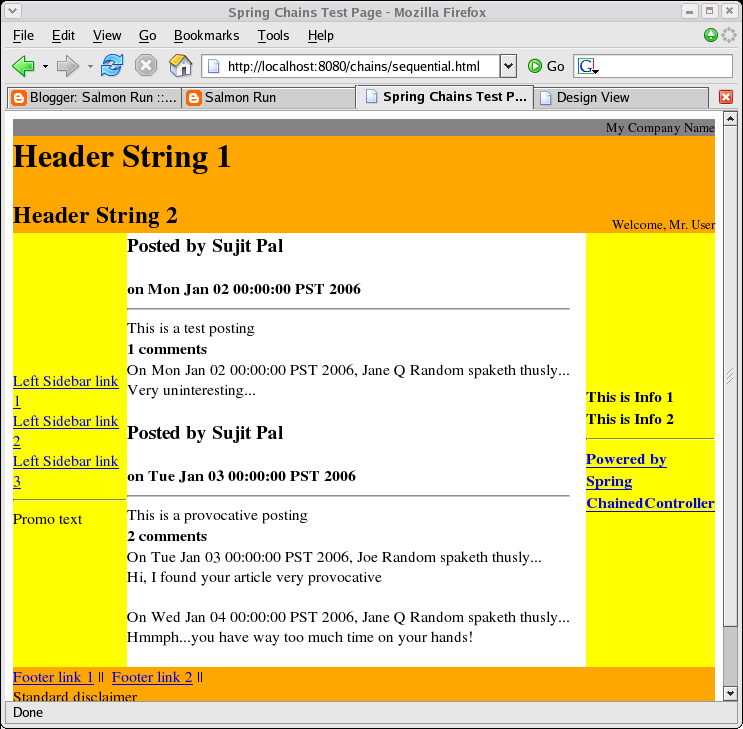
Sorry about the cheesy subtitle, but in a sense it is appropriate. Let me explain. The example web application I wrote to test the ChainedController uses JSTL on the front-end. Each controller in the chain is associated with one (or more, but at least one) JSP file. Thus the controller + JSP can be thought of as a single component. The components are brought together on the web page by plugging them into a Tiles layout.

For most web applications (at least the ones I am familiar with), the Java/JSP developer does not write the HTML that the user sees on his browser. A graphic artist (usually a HTML/CSS guru) builds a mockup with data that goes "Lorem Ipsum..." and gives it to the web developer. The web developer then works backward to fill out the "Lorem Ipsum..." stuff with valid data from a real data source. I feel this process is backward, since it is not round-trip. If there is a change, the HTML designer is generally not able to tweak the JSP to reflect that. So the web developer is stuck merging presentation changes from the new mockup into the JSP, which is more difficult and time-consuming than if the presentation changes were directly applied to the JSP.

One team I know actually reversed this flow, and they used Velocity as their view layer. Since Velocity syntax is simpler, the HTML writer was able to double as a Velocity coder as well. What the Java developer provided was full documentation of the bean(s) available in the page context. Since JSTL provides a similar bean abstraction (by means of a dotted notation), the DesignView is an attempt to provide, via reflection, a table of key-value pairs of all variables (and their values, based on test data) available to the JSTL coder in the page context. Here is the code for the DesignView:

  1
  2
  3
  4
  5
  6
  7
  8
  9
 10
 11
 12
 13
 14
 15
 16
 17
 18
 19
 20
 21
 22
 23
 24
 25
 26
 27
 28
 29
 30
 31
 32
 33
 34
 35
 36
 37
 38
 39
 40
 41
 42
 43
 44
 45
 46
 47
 48
 49
 50
 51
 52
 53
 54
 55
 56
 57
 58
 59
 60
 61
 62
 63
 64
 65
 66
 67
 68
 69
 70
 71
 72
 73
 74
 75
 76
 77
 78
 79
 80
 81
 82
 83
 84
 85
 86
 87
 88
 89
 90
 91
 92
 93
 94
 95
 96
 97
 98
 99
100
101
102
103
104
105
106
107
108
109
110
111
112
113
114
115
116
117
118
119
120
121
122
123
124
125
126
127
128
129
130
131
132
133
134
135
136
137
138
139
140
141
142
143
144
145
146
147
148
149
150
151
152
153
154
155
156
157
158
159
160
161
162
163
164
165
166
167
168
169
170
171
172
173
174
175
176
177
178
179
180
181
182
183
184
185
186
187
package org.springchains.framework.views;
 
import java.io.PrintWriter;
import java.util.ArrayList;
import java.util.Collection;
import java.util.Iterator;
import java.util.LinkedHashMap;
import java.util.List;
import java.util.Map;
import java.util.Set;
 
import javax.servlet.http.HttpServletRequest;
import javax.servlet.http.HttpServletResponse;
 
import org.apache.commons.beanutils.PropertyUtils;
import org.apache.commons.lang.StringEscapeUtils;
import org.apache.commons.lang.StringUtils;
import org.springframework.web.servlet.View;
 
/**
 * A simple view implementation that renders the contents of the Model as
 * a tabular display of key-value pairs. The keys are displayed as JSTL
 * variables, which can provide information to the HTML designer.
 * @author Sujit Pal
 * @version $Revision: 1.1 $
 */
public class DesignView implements View {
 
    public DesignView() {
        super();
    }
     
    /**
     * The View renderer.
     * @param model the Model from the ModelAndView object generated by the
     * Controller.
     * @param request the HttpServletRequest object.
     * @param response the HttpServletResponse object.
     * @throws Exception if one is thrown.
     */
    @SuppressWarnings("unchecked")
    public void render(Map model, HttpServletRequest request, HttpServletResponse response) throws Exception {
        List<Map<String,String>> keyValuePairList = new ArrayList<Map<String,String>>();
        Set<String> keys = model.keySet();
        for (String key : keys) {
            Object obj = model.get(key);
            Map<String,String> keyValuePairs = new LinkedHashMap<String,String>();
            keyValuePairs.put(key, obj.getClass().getName());
            renderBeanAsNameValuePairs(keyValuePairs, obj, key);
            keyValuePairList.add(keyValuePairs);
        }
        PrintWriter writer = response.getWriter();
        String htmlOutput = renderHtmlFromKeyValuePairList(keyValuePairList);
        response.setContentLength(htmlOutput.length());
        response.setContentType("text/html");
        writer.print(htmlOutput);
        writer.flush();
        writer.close();
    }
 
    /**
     * Traverses the bean graph for the bean specified by obj, and populates
     * a Map of keyValue pairs. This is a recursive function, which will be
     * called on dependent objects for the top-level bean. Recursion stops when
     * the Object encountered is "printable" as reported by isPrintable().
     * @param keyValuePairs the Map of key-value pairs to populate.
     * @param obj the object to render.
     * @param prefix the prefix (the top level call is the key name), and any
     * subsequent recursive calls adds extra parts to the prefix.
     * @throws Exception if one is thrown.
     */
    @SuppressWarnings("unchecked")
    private void renderBeanAsNameValuePairs(Map<String,String> keyValuePairs, Object obj, String prefix) throws Exception {
        Map<String,Object> properties = PropertyUtils.describe(obj);
        for (String propertyName : properties.keySet()) {
            if ("class".equals(propertyName)) {
                continue;
            }
            Object property = properties.get(propertyName);
            if (property.getClass().isPrimitive()) {
                // the property is a primitive, such as int, long, double, etc.
                keyValuePairs.put(prefix + "." + propertyName, String.valueOf(property));
            } else if (isPrintableObject(property)) {
                // the property is a printable, see isPrintable()
                keyValuePairs.put(prefix + "." + propertyName, StringUtils.defaultString(property.toString(), "NULL"));
            } else if (property instanceof Collection) {
                // the property is a collection, iterate and recurse
                Collection collectionProperty = (Collection) property;
                keyValuePairs.put(prefix + "." + propertyName + ".size()", String.valueOf(collectionProperty.size()));
                int i = 0;
                for (Iterator it = collectionProperty.iterator(); it.hasNext();) {
                    Object indexedProperty = it.next();
                    renderBeanAsNameValuePairs(keyValuePairs, indexedProperty, prefix + "." + propertyName + "[" + i + "]");
                    i++;
                }
            } else {
                // recurse down the object graph
                renderBeanAsNameValuePairs(keyValuePairs, property, prefix + "." + propertyName);
            }
        }
    }
 
    /**
     * Returns true if the object is a printable object, ie, a toString()
     * on the object will return a descriptive idea of the contents. These
     * include all the base classes in java.lang (String, Integer, etc)
     * and some others such as java.util.Date and java.math.BigDecimal.
     * This list is subject to change as we encounter other classes which
     * can be considered printable for the purpose of our DesignView.
     * @param obj the Object to test.
     * @return true or false.
     */
    private boolean isPrintableObject(Object obj) {
        if (obj == null) {
            return true;
        }
        String className = obj.getClass().getName();
        if (className.startsWith("java.lang.")) {
            return true;
        } else if ("java.util.Date".equals(className)) {
            return true;
        } else if ("java.math.BigDecimal".equals(className)) {
            return true;
        }
        return false;
    }
 
    /**
     * Generates a standard HTML document (with a gray screen) with an
     * embedded table showing the variables available to the HTML designer
     * to embed dynamic content into the page.
     * @param keyValuePairList a List of Maps, each Map corresponds to a single
     * Model key.
     * @return a String which can be pushed into the response.
     */
    private String renderHtmlFromKeyValuePairList(List<Map<String,String>> keyValuePairList) {
        StringBuffer buf = new StringBuffer();
        buf.append("<!DOCTYPE HTML PUBLIC \"-//W3C//DTD HTML 4.01 Transitional//EN\">").
            append("<html>").
            append("<head>").
            append("<title>Design View</title>").
            append("<body>").
            append("<table cellspacing=\"3\" cellpadding=\"3\" border=\"1\">");
        for (Map<String,String> keyValuePair : keyValuePairList) {
            int i = 0;
            for (String key : keyValuePair.keySet()) {
                if (i == 0) {
                    // header, blue background
                    buf.append("<tr bgcolor=\"blue\" fgcolor=\"white\">").                        append("<td><b>").
                        append(StringEscapeUtils.escapeHtml(key)).
                        append("</b></td>").
                        append("<td>").
                        append(StringEscapeUtils.escapeHtml(keyValuePair.get(key))).
                        append("</td>").
                        append("</tr>");
                } else if (key.endsWith(".size()")) {
                    // collection, make light gray
                    buf.append("<tr bgcolor=\"gray\">").
                        append("<td><b>").
                        append(StringEscapeUtils.escapeHtml(key)).
                        append("</b></td>").
                        append("<td>").
                        append(StringEscapeUtils.escapeHtml(keyValuePair.get(key))).
                        append("</td>").
                        append("</tr>");
                } else {
                    // not header, white background
                    buf.append("<tr>").
                        append("<td><b>${").
                        append(StringEscapeUtils.escapeHtml(key)).
                        append("}</b></td>").
                        append("<td>").
                        append(StringEscapeUtils.escapeHtml(keyValuePair.get(key))).
                        append("</td>").
                        append("</tr>");
                }
                i++;
            }
        }
        buf.append("</table>").
            append("</body>").
            append("</head>").
            append("</html>");
        return buf.toString();
    }
 
}

Yes, I know that the rendering is done in Java instead of using a template, and that its harder to maintain. However, this is unlikely to be modified very frequently, so its probably ok to not use an external template to do this.

Each component controller is configured with the DesignView by default. The JSTL coder will be able to change it to something else via configuration if desired. An example of how to set up the DesignView as the default is shown below:

1
2
3
4
5
6
    public ModelAndView handleRequest(HttpServletRequest request, HttpServletResponse response) throws Exception {
        ModelAndView mav = new ModelAndView();
        // do something with the model
        ...
        mav.setView(new DesignView());
        return mav;

A screenshot of the DesignView of the central component (MainBody) is shown below on the left, and the actual page is shown on below on the right. The DesignView specifies the name of the bean that has to be bound using a jsp:useBean in blue. All other rows refer to JSTL variables available to the JSTL programmer.

Saturday, February 18, 2006

Spring in Chains

A long time ago, before Spring, and even before Struts and Webwork, I worked with a home-grown proprietary web development framework which was based on the Chain of Responsibility pattern. What it did was allow the developer to write small modules and chain them together to handle the request. When the Controller encountered the first module, it would instantiate a Context object and stick it into the Request. Each module would interact with the Context, sometimes adding fresh data and sometimes using data that modules earlier in the chain had written into it. The framework had its warts, but it was very easy to add new functionality to web pages - simply stick a new module into the chain that generates the data you need and add the presentation for the data on the view JSP.

I have been working with Spring for about 2 projects now, and while I think its MVC implementation is by far simpler and more extensible than Struts or Webwork (the other two frameworks I know), I did not find the functionality I described above, so I set about writing one. This article describes the main features of the ChainedController, includes the code, and explains how to set up some typical chaining configurations.

I originally thought that I could use the Apache Commons Chains project to implement the additional functionality, but a quick look through its feature set indicated that it would not work for me. Specifically, Apache Commons Chains has as its unit of chaining a Task object, which would be incompatible with my unit of chaining, a Controller object. Secondly, I wanted to be able to chain tasks to execute in parallel as well as sequentially, while Chains provide for sequential chains only.

My ChainedController implements the Spring Controller interface. The Controller itself takes as a parameter a List of other Controllers it should chain. The second parameter it takes is the chaining policy - can be either parallel or sequential (the default if not specified). The third parameter is the view name the Chained controller should forward to.

The code for the ChainedController is here:

  1
  2
  3
  4
  5
  6
  7
  8
  9
 10
 11
 12
 13
 14
 15
 16
 17
 18
 19
 20
 21
 22
 23
 24
 25
 26
 27
 28
 29
 30
 31
 32
 33
 34
 35
 36
 37
 38
 39
 40
 41
 42
 43
 44
 45
 46
 47
 48
 49
 50
 51
 52
 53
 54
 55
 56
 57
 58
 59
 60
 61
 62
 63
 64
 65
 66
 67
 68
 69
 70
 71
 72
 73
 74
 75
 76
 77
 78
 79
 80
 81
 82
 83
 84
 85
 86
 87
 88
 89
 90
 91
 92
 93
 94
 95
 96
 97
 98
 99
100
101
102
103
104
105
106
107
108
109
110
111
112
113
114
115
116
117
118
119
120
121
122
123
124
125
126
127
128
129
130
131
132
133
134
135
136
137
138
139
140
141
142
143
144
145
146
147
148
149
150
151
152
153
154
155
156
157
158
159
160
161
162
163
164
165
166
167
168
169
170
171
172
173
174
175
176
177
package org.springchains.framework.controllers;

import java.util.List;
import java.util.concurrent.Callable;
import java.util.concurrent.ExecutionException;
import java.util.concurrent.ExecutorService;
import java.util.concurrent.Executors;
import java.util.concurrent.Future;

import javax.servlet.http.HttpServletRequest;
import javax.servlet.http.HttpServletResponse;

import org.apache.commons.lang.StringUtils;
import org.springframework.web.servlet.ModelAndView;
import org.springframework.web.servlet.mvc.Controller;

/**
* ChainsController uses the Chain of Responsibility Pattern to delegate
* control to a chain of Controller objects that are passed into it at
* configuration time. A ChainsController also takes an additional
* policy setting that decides whether it should delegate to the
* Controller chain in a serial or parallel manner. A ChainsController
* is itself a Controller, which means that a ChainsController can be
* passed in as a parameter to another ChainsController. This allows for
* very fine-grained control over the entire controller chain.
* @author Sujit Pal
* @version $Revision$
*/
public class ChainedController implements Controller {
  
   private List<Controller> controllers;
   private boolean parallel = false;
   private String viewName;
  
   private class CallableController implements Callable<ModelAndView> {
       private Controller controller;
       private HttpServletRequest request;
       private HttpServletResponse response;
      
       public CallableController(Controller controller, HttpServletRequest request, HttpServletResponse response) {
           this.controller = controller;
       }
      
       public ModelAndView call() throws Exception {
           return controller.handleRequest(request, response);
       }
   };
  
   /**
    * Set a List of Controller objects that must be chained.
    * @param controllers a List of Controllers.
    */
   public void setControllerChain(List<Controller> controllers) {
       this.controllers = controllers;
   }
  
   /**
    * Set the policy using which the Controller objects must be invoked.
    * By default, parallel is set to false, which means that the
    * chain of Controllers will be called serially. If set to true, the
    * ChainedController will spawn a thread for each of the Controllers in
    * the chain, and execute all threads simultaneously. In either case,
    * an exception thrown by one of the Controllers in the chain will
    * result in an exception thrown by the ChainsController itself.
    * @param parallel if true, serial if false.
    */
   public void setParallel(boolean parallel) {
       this.parallel = parallel;
   }
  
   /**
    * Allows declarative setting of the final view name. This may also
    * be programatically defined by subclassing the ChainedController.
    * @param viewName the name of the view the controller will forward to.
    */
   public void setViewName(String viewName) {
       this.viewName = viewName;
   }
  
   /**
    * Handles the request and builds a ModelAndView object to forward to the
    * view layer. Delegates to the private handleRequestXXX() methods based
    * on whether parallel is set to true or false.
    * @param request the HttpServletRequest object.
    * @param response the HttpServletResponse object.
    * @return a ModelAndView object.
    * @exception if one is thrown by the controllers in the chain.
    */
   public ModelAndView handleRequest(HttpServletRequest request, HttpServletResponse response) throws Exception {
       return (parallel ? handleRequestParallely(request, response) : handleRequestSequentially(request, response));
   }
  
   /**
    * Spawns multiple threads, one for each controller in the list of
    * controllers, and within each thread, delegates to the controller's
    * handleRequest() method. Once all the threads are complete, the
    * ModelAndView objects returned from each of the handleRequest()
    * methods are merged into a single view. The view name for the model
    * is set to the specified view name. If an exception is thrown by
    * any of the controllers in the chain, this exception is propagated
    * up from the handleRequest() method of the ChainedController.
    * @param request the HttpServletRequest object.
    * @param response the HttpServletResponse object.
    * @return a merged ModelAndView object.
    * @throws Exception if one is thrown from the controllers in the chain.
    */
   @SuppressWarnings("unchecked")
   private ModelAndView handleRequestParallely(HttpServletRequest request, HttpServletResponse response) throws Exception {
       ExecutorService service = Executors.newCachedThreadPool();
       int numberOfControllers = controllers.size();
       CallableController[] callables = new CallableController[numberOfControllers];
       Future<ModelAndView>[] futures = new Future[numberOfControllers];
       for (int i = 0; i < numberOfControllers; i++) {
            callables[i] = new CallableController(controllers.get(i), request, response);
            futures[i] = service.submit(callables[i]);
       }
       ModelAndView mergedModel = new ModelAndView();
       int i = 0;
       for (Future<ModelAndView> future : futures) {
           try {
               ModelAndView model = future.get();
               if (model != null) {
                   mergedModel.addAllObjects(model.getModel());
               }
               i++;
           } catch (ExecutionException e) {
               throw new Exception(
                   "Controller: " + controllers.get(i).getClass().getName() +
                   " threw exception: " + e.getMessage(), e);
           }
       }
       if (StringUtils.isNotEmpty(this.viewName)) {
           mergedModel.setViewName(this.viewName);
       }
       return mergedModel;
   }
  
   /**
    * Calls the handleRequest controller for each of the Controllers in the
    * chain sequentially, merging the ModelAndView objects returned after each
    * call and returning the merged ModelAndView object. An exception thrown
    * by any of the controllers in the chain will propagate upwards through
    * the handleRequest() method of the ChainedController. The ChainedController
    * itself does not support any communication between the controllers in the
    * chain, but this can be effected by the controllers posting to a common
    * accessible object such as the ApplicationContext. Note that this will
    * introduce coupling between the controllers and will be difficult to
    * arrange into a parallel chain. A controller can stop processing of the
    * chain by returning a null ModelAndView object.
    * @param request the HttpServletRequest object.
    * @param response the HttpServletResponse object.
    * @return the merged ModelAndView object for all the controllers.
    * @throws Exception if one is thrown by one of the controllers in the chain.
    */
   public ModelAndView handleRequestSequentially(HttpServletRequest request, HttpServletResponse response) throws Exception {
       ModelAndView mergedModel = new ModelAndView();
       for (Controller controller : controllers) {
           try {
               ModelAndView model = controller.handleRequest(request, response);
               if (model == null) {
                   // chain will stop if a controller returns a null
                   // ModelAndView object.
                   break;
               }
               mergedModel.addAllObjects(model.getModel());
           } catch (Exception e) {
               throw new Exception(
                   "Controller: " + controller.getClass().getName() +
                   " threw exception: " + e.getMessage(), e);
           }
       }
       if (StringUtils.isNotEmpty(this.viewName)) {
           mergedModel.setViewName(this.viewName);
       }
       return mergedModel;
   }
}

The chaining policy and the magic of Spring declarative configuration allows the ChainedController to be chained in a variety of interesting ways. To test my implementation, I set up a web application to display a page containing 5 tiles - the Header, Footer, Left and Right sidebars and the Main Body. The examples show the ChainedController configuration to implement a sequential, parallel and hybrid chain.

A sequential configuration looks like this:

 1
 2
 3
 4
 5
 6
 7
 8
 9
10
11
12
13
   <bean id="sequentialChainedController" class="org.springchains.framework.controllers.ChainedController">
       <property name="controllerChain">
           <list>
               <ref bean="headerController" />
               <ref bean="leftSidebarController" />
               <ref bean="rightSidebarController" />
               <ref bean="mainBodyController" />
               <ref bean="footerController" />
           </list>
       </property>
       <property name="parallel" value="false" />
       <property name="viewName" value="main" />
   </bean>

A parallel configuration with the same set of controllers would look like this:

 1
 2
 3
 4
 5
 6
 7
 8
 9
10
11
12
13
   <bean id="parallelChainedController" class="org.springchains.framework.controllers.ChainedController">
       <property name="controllerChain">
           <list>
               <ref bean="headerController" />
               <ref bean="leftSidebarController" />
               <ref bean="rightSidebarController" />
               <ref bean="mainBodyController" />
               <ref bean="footerController" />
           </list>
       </property>
       <property name="parallel" value="true" />
       <property name="viewName" value="main" />
   </bean>

Spring also allows you to refer to other bean collections using a reference. Using this feature, one can set up arbitarily complex chains, which are hybrids of sequential and parallel chains. Obviously, you would want to think about these chains when you build them, to make sure they make sense. Here is an example, based on the assumption that the mainBody component will take about the same time to generate and render compared to all the other components put together:

 1
 2
 3
 4
 5
 6
 7
 8
 9
10
11
12
13
14
15
16
17
18
19
20
21
22
23
   <bean id="nonMainBodyChainedController" class="org.springchains.framework.controllers.ChainedController">
       <property name="controllerChain">
           <list>
               <ref bean="headerController" />
               <ref bean="leftSidebarController" />
               <ref bean="rightSidebarController" />
               <ref bean="footerController" />
           </list>
       </property>
       <property name="parallel" value="false" />
       <property name="viewName" value="main" />
   </bean>
                                                                             
   <bean id="hybridChainedController" class="org.springchains.framework.controllers.ChainedController">
       <property name="controllerChain">
           <list>
               <ref bean="nonMainBodyChainedController" />
               <ref bean="mainBodyController" />
           </list>
       </property>
       <property name="parallel" value="true" />
       <property name="viewName" value="main" />
   </bean>

Sometimes it is necessary to decide, based on the contents of the model, which view to forward to. The default ChainedController would not help in this case. You may have to subclass the ChainedController, and make the decision in the handleRequest method, something like this:

 1
 2
 3
 4
 5
 6
 7
 8
 9
10
11
public ModelAndView handleRequest(
       HttpServletRequest request, HttpServletResponse response)
       throws Exception {
   ModelAndView mav = super.handleRequest(request, response);
   if (mav.getModel().get("somedata") != null) {
       mav.setViewName("view1");
   } else {
       mav.setViewName("view2");
   }
   return mav;
}

Why would one use chaining? Well, the answer depends on what you are using to achieve the same functionality currently. If you are using interceptors to put logic before and after your controller logic, then I think that being able to chain your controllers is going to have better performance, since interceptors use AOP, and AOP is quite a performance hog. If you write all your code in a monolithic controller, depending on a service layer to delegate the logic within your controller for each page component, you would still need to add or remove code when components are added or removed from your page. With chained controllers, adding or removing a component involves only configuration changes.

Another advantage to using chaining, especially if you have a Tile or Tile-like setup on your front end, where a page is broken up into distinct components, is the componentization it allows. Tiles already componentizes the page, but chaining allows you to link a single controller with a tile. This controller + tile combo can be dropped into another page without having to write a line of Java code.

Some caveats, though. Unlike the framework from which the ChainedController is inspired by, there is no built-in way for controllers in a chain to communicate via a Context object. For parallel chains, it would not make much sense anyway, since by definition, controllers chained parallely cannot depend on each other. For sequential chains, however, it should be fairly easy to establish a ThreadLocal reference to a specific bean in the ApplicationContext.

Another difference is that the original framework did not allow for parallel chaining. I thought that it may be useful for generating extremely content heavy or portal style pages, where a bunch of functionally unrelated components are thrown together on a single page because it makes sense to have them on the same page from a user's point of view. Generation of these components could happen in parallel, since they dont depend on each other functionally, and be presented to the user quicker. Of course, there is a price to pay - each request generates multiple threads, equal to the number of controllers in the parallel chain, instead of a single thread per request. Of course, the threads will terminate faster (or so we hope). I haven't tried the ChainedController implementation under load, so I do not know how this would scale to heavy traffic.

Finally, I am a little surprised that no one has done this before. It is possible that people have thought of it, and think its a bad idea. If you think this is a bad idea, please do let me know.

During this exercise, I took the opportunity to learn JSTL by doing all my JSPs using JSTL. Here are some links I used for this, hopefully they will be useful to others trying to learn JSTL as well.