Showing posts with label etl. Show all posts

Sunday, March 02, 2014

Cleaning UMLS data and Loading into Graph


The little UMLS ontology I am building needs to support two basic features in its user interface - findability and navigability. I now have a reasonable solution for the findability part, and I am planning to use Neo4j (a graph database) for the navigability part.

As before, the nodes are extracted from the MRCONSO table. The relationships between nodes are extracted from the MRREL table. Both SQL queries are shown below:

1
 2
 3
 4
 5
 6
 7
 8
 9
10
11
12
mysql> select CUI, STR from MRCONSO
...    where LAT = 'ENG'
...    into outfile '/tmp/cuistr.csv'
...    fields terminated by '\t'
...    lines terminated by '\n';
Query OK, 7871075 rows affected (27.03 sec)

mysql> select CUI1, CUI2, RELA from MRREL 
...    into outfile '/tmp/cuirel.csv' 
...    fields terminated by '\t'
...    lines terminated by '\n';
Query OK, 58024739 rows affected (1 min 17.78 sec)

The Neo4j community seems to have standardized on Michael Hunger's batch-import tool for loading data into Neo4j. It takes as input tab separated files for the nodes and relationships, and writes out the graph into an embedded database. The node file(s) should specify a nodeId, and one or more properties separated by tabs. The relationship file(s) should specify the start node, end node, relationship name, and zero or more relationship properties separated by tabs.

Since my node file (cuistr.csv) was normalized (one row per synonym), I needed to transform this file to a (cui, list(str)) format. I decided to use MRJob (a Python based Map-Reduce framework from Yelp that you can use to run your jobs on Hadoop and Amazon EMR, although I just ran them locally) to write a little Map-Reduce job to do this.

1
 2
 3
 4
 5
 6
 7
 8
 9
10
11
12
13
14
15
16
17
18
19
20
21
22
# syns_aggregator_job.py
from mrjob.job import MRJob

class SynsAggregatorJob(MRJob):
  """
  Groups unique synonyms by CUI. 
  Input format: (CUI,DESCR)
  Output format: (CUI,[DESCR,...])
  """

  def mapper(self, key, value):
    (cui, descr) = value.split("\t")
    yield cui, descr

  def reducer(self, key, values):
    uniqSyns = set()
    for value in values:
      uniqSyns.add(value)
    print "%s\t%s" % (key, list(uniqSyns))

if __name__ == "__main__":
  SynsAggregatorJob.run()

I ran this locally with the following command to aggregate the 7,871,075 records into an aggregated file cuistr_agg.csv with 2,880,385 records.

1
2
sujit@tsunami:umls$ python syns_aggregator_job.py \
    /path/to/cuistr.csv > /path/to/cuistr_agg.csv 

I also built another job to remove edges that referred to non-existent nodes. Notice that in the SQL I only retrieved English names (LAT='ENG'), and there is no corresponding filter on the MRREL query. This step is actually unnecessary because the batch-import tool checks and skips such rows, but I include it here anyway because it seems to me to be quite a nice way to remove non-existent rows without having to look up a dictionary. But if you are trying to replicate, you should skip doing this step.

1
 2
 3
 4
 5
 6
 7
 8
 9
10
11
12
13
14
15
16
17
18
19
20
21
22
23
24
25
26
27
28
29
30
31
32
33
34
35
36
37
38
39
40
41
42
43
44
45
46
# rels_filter_job.py
from mrjob.job import MRJob
from mrjob.step import MRStep
from mrjob.compat import get_jobconf_value

class RelsFilterJob(MRJob):
  """
  Removes records from CUIREL where either node in a relation
  does not exist in CUISYN. Needs to be run twice - first run
  removes one non-existent CUI, second run removes second non
  existent CUI.
  Input format: (CUI, SYN_LIST) - from CuiSynsJob OR
                (CUI1, REL, CUI2)   - from cuirels.csv
  Output format: (CUI1, CUI2, REL)
  """

  def mapper_init(self):
    self.cui_idx = int(get_jobconf_value("cui_idx"))

  def mapper(self, key, value):
    ncols = len(value.split("\t"))
    if ncols == 2:
      # from the output of SynsAggregatorJob
      (cui, payload) = value.split("\t")
      yield (cui, "XXX")
    else:
      # from cuirels
      cols = value.split("\t")
      yield (cols[self.cui_idx], value)

  def reducer(self, key, values):
    # if one of the records in the reduced set has value XXX 
    # then all the values (except the XXX one) are good
    include = False
    vallist = []
    for value in values:
      if value == 'XXX':
        include = True
        continue
      vallist.append(value)
    if include:
      for value in vallist:
       print value
    
if __name__ == "__main__":
  RelsFilterJob.run()

I ran the above job twice, first to remove relationship rows which had non-existent source CUIs, and the second to remove ones with non-existent target CUIs. The JobConf parameter specifies which CUI to check. Here are the commands:

1
2
3
4
5
6
7
8
sujit@tsunami:umls$ python rels_filter_job.py \
    --jobconf cui_idx=0 \
    /path/to/cuistr_agg.csv /path/to/cuirel.csv > \
    /path/to/cuirel_filt_left.csv
sujit@tsunami:umls$ python rels_filter_job.py \
    --jobconf cui_idx=1 \
    /path/to/cuirel_agg.csv /path/to/cuirel_filt_left.csv > \
    /path/to/cuirel_filt_right.csv

This resulted in a much less dramatic reduction from 58,024,739 records in the source cuirel.csv file to 58,021,093 records in the cuirel_filt_right.csv target. However, as mentioned above, this step is unnecessary (and time-consuming), we can provide the cuirel.csv file to batch-import and it will do the right thing.

Batch Import did not run for me out of the box. In order to make it run, I had to parse the instructions on the README file multiple times, as well as do several searches on Neo4j's mailing list on Google Groups. I describe below what I had to do to make it run for my data.

My input files are cuistr_agg.csv (for the nodes) and cuirel_filt_right.csv (for the relationships). I needed to put headers on both of them to indicate to batch-import what the property names were and which fields I should be able to look up. This is because internally Neo4j uses longs to refer to node IDs - since my unique key for a node is the CUI (a string field), it creates a Lucene index to map the CUI to the internal node ID. Here are the first 10 rows from both files, showing the headers - the empty space between fields are tabs. The header creates a Lucene index called "concepts" that maps the string field "CUI" to the internal Neo4j nodeID.

1
 2
 3
 4
 5
 6
 7
 8
 9
10
11
12
13
14
15
16
17
18
19
20
21
22
23
24
25
# cuistr_agg.csv
cui:string:concepts  syns
C0000005             ['(131)I-MAA', '(131)I-Macroaggregated Albumin']
C0000039             ['Dipalmitoylglycerophosphocholine', ...]
C0000052             ['1,4-alpha-D-Glucan:1,4-alpha-D-glucan ...]
C0000074             ['1 Alkyl 2 Acylphosphatidates', ...]
C0000084             ['1 Carboxyglutamic Acid', ...]
C0000096             ['Isobutyltheophylline', ...]
C0000097             ['Methylphenyltetrahydropyridine (substance)', ...]
C0000098             ['1 Methyl 4 phenylpyridine', ...]
C0000102             ['a- Naphthylamine', '1 Naphthylamine', ...]
...

# cuirel_filt_right.csv
cui:string:concepts  cui:string:concepts  rela
C0000039             C0000039             entry_version_of
C0000039             C0000039             has_entry_version
C0000039             C0000039             has_permuted_term
C0000039             C0000039             has_sort_version
C0000039             C0000039             has_translation
...

To download and compile batch-import, run the following commands:

1
2
3
sujit@tsunami:Downloads$ git clone https://github.com/jexp/batch-import.git
sujit@tsunami:Downloads$ cd batch-import
sujit@tsunami:batch-import$ mvn clean compile assembly:single

My first attempt to run the importer just hung. I needed to add the following two properties to the batch.properties file supplied with batch-import.

1
2
3
4
5
6
7
# create lucene index "concepts" for exact lookup
batch_import.node_index.concepts=exact

# input CSVs don't have quoted fields. Apparently this speeds
# things up considerably since it allows use of a simpler CSV
# parser.
batch_import.csv.quotes=false

Finally, batch-import sets an upper limit on the length of a property value (possibly for performance) in Chunker.BUFSIZE. Since I was using JSON-ified lists for synonyms, this field can be very long and the import would fail until I set Chunker.BUFSIZE from 32*1024 to 128*1024. I had to rebuild the JAR (mvn assembly:single) after this change. The following command created my Neo4j database in target/db and loaded my two files into it.

1
 2
 3
 4
 5
 6
 7
 8
 9
10
11
12
13
14
15
16
sujit@tsunami:batch-import$ java -server -Dfile.encoding=UTF-8 -Xmx4G \
    -jar target/batch-import-jar-with-dependencies.jar \
    target/db /path/to/cuistr_agg.csv /path/to/cuirel_filt_right.csv

Using Existing Configuration File
............................
Importing 2880384 Nodes took 117 seconds 
..................................................... 58903 ms for 10000000
..................................................... 194346 ms for 10000000
..................................................... 419848 ms for 10000000
..................................................... 274616 ms for 10000000
..................................................... 507095 ms for 10000000
..................................................... 
Importing 58021093 Relationships took 1764 seconds 

Total import time: 1901 seconds 

In order to verify that the database was built correctly, I copied the contents of target/db over to /var/lib/neo4j/data/graph.db, the data directory of a Neo4j installation I had installed using apt-get install. Unfortunately, there is a version mismatch, so the database was unreadable. To get the correct version of Neo4j, I looked at the POM file of batch-import (neo4j.version was set to 1.9) and found a tarball download of the same version here. Installation consisted of exploding the tarball and starting the server with bin/neo4j start).

1
2
3
sujit@tsunami:opt$ sudo tar xvzf neo4j-community-1.9.6-unix.tar.gz
sujit@tsunami:opt$ cd neo4j-community-1.9.6
sujit@tsunami:neo4j-community-1.9.6$ bin/neo4j start

The server exposes a Web Admin client (similar to the Solr Admin client) at port 7474 (http://localhost:7474/webadmin/). The dashboard shows 2,880,385 nodes, 3,375,083 properties, 58,021,093 relationships and 653 relationship types, which matches with what we put in.

Thats all I have for today. Next week I hope to learn more about Neo4j, specifically its Cypher Query Language, and see if I can model some common use-cases using it.

Monday, December 23, 2013

Akka Content Ingestion Pipeline, Part I


I just finished attending Coursera's Reactive Programming classes in "spectator" mode (just watched the videos). The course was conducted by Martin Odersky (creator of Scala), Eric Meijer (creator of LINQ, he teaches about Monads) and Roland Kunh (Akka Tech Lead). My main draw for the course was the coverage of Akka Actors, something I have been intending to learn for a while, although I learned a lot from the other lectures as well. I first came across Scala Actors 5 years ago, but I didn't pursue it, mainly because the parallelism the approach offered was limited to a single JVM (implying a single large machine rather than many small machines). At the time, the Akka project was just getting started.

Today, Akka allows you to deploy actors across multiple JVMs on multiple machines in a network, is available in Scala and Java (important for addressing maintainability concerns in Java-only shops like mine), and provides additional supporting infrastructure via the Typesafe stack. It has progressed to the extent that it is the preferred Actor implementation for Scala 2.10+. It has a vibrant community and (reasonably) good documentation, so its not too hard to get started using it.

The example I choose as a vehicle for learning Akka is based on the Nutch pipeline. Its a pipeline I am very familiar with, we run a variant of this at work for our own content ingestion. Nutch runs on Hadoop as a series of Map-Reduce batch jobs, first fetching the pages, then parsing out key-value pairs out of them, and finally sending the key-value pairs and content off to the indexer so it can be searched by clients. Additionally (with NutchGORA) the data is persisted into a NoSQL database during the fetch and parse steps, so it can potentially be used as a content service as well. The example is non-trivial, so I decided to build it in steps and describe the evolution of this system across multiple posts, rather than describing the whole thing in one giant post 4 weeks later. Makes it easier for both of us.

The diagram below shows the actors and the message flows in our example system. There are 2 message flows (indicated by blue and red text and arrows). This is a message-passing model and looks more like the example I used for comparing various actor implementations 5 years ago than the NutchGORA model, but the business process is the same.


The top-level actor in our system is the Controller. The controller is the actor that other actors or callers from the outside interact with. The controller spawns three router actors on startup - the fetchersRouter, parsersRouter and the indexersRouter, which in turn spawn a fixed number (based on configuration) worker actors. In addition, the Controller also starts up a Reaper actor and registers the routers with it. All these actor startup is indicated by dotted green lines. From a class structure point of view, this means that the Controller, routers and the Reaper can refer to each other using references (without having to look it up from the context). The worker actors communicate only with its parent routers.

Our first message flow is the Fetch message. A Fetch message includes the URL to fetch, the current fetch depth, and any metadata included with the URL. The fetch depth is important for web crawling, where a depth > 0 indicates that outlinks must be crawled. The metadata is important for situations where you are parsing feeds and you want to carry over the title and summary from the feed rather than (or in addition to) parsing it, or supply additional data such as file create/modify dates for when you are fetching files from the local filesystem. We describe the Fetch message flow below:

  1. Fetch message is sent to the controller.
  2. Controller forwards the message to the Fetcher Router.
  3. Fetcher Router forwards the message to one of the workers, using Round Robin routing policy.
  4. If the URL is eligible to be downloaded, the Fetcher Worker downloads the URL and writes the contents and metadata into the database. Once done, it sends a FetchComplete message to the Fetcher Router that includes the database ID of the inserted record.
  5. This results in the Controller receiving a FetchComplete message, to which it responds by sending a Parse message to the Parser Router.
  6. The Parser Router forwards the Parse message to one of its workers.
  7. The Parse Worker retrieves the contents of the file from the database using the ID, converts the file to text and parses relevant key-value pairs from it. It then writes these key-value pairs and the text content back to the database. Once done, it sends a ParseComplete message back to its router.
  8. If the depth > 0, the parsing process also involves parsing the content for embedded outbound links, which are enqueued as additional Fetch requests on the Fetch Router.
  9. This results in the Controller receiving a ParseComplete message, to which it responds by sending an Index message to the Index Router.
  10. The Index Router forwards the Index message to one of its workers.
  11. The Index Worker retrieves the key-value pairs from the database and publishes the record to a Solr index. Once done, it sends back an IndexComplete message to its parent.

The other message to handle is the Stop message, which allows actors to consume all messages that are enqueued currently, then shut them down. Here is how that works.

  1. Stop message is sent to the Controller.
  2. The Controller forwards the Stop Message to the Reaper. At startup, each of the routers were registered with the Reaper, so the Reaper adds their references to a List and begins monitoring them for Termination (DeathWatch).
  3. The Reaper sends a PoisonPill message wrapper in a Broadcast message to the FetchRouter. Using the Broadcast wrapper ensures that the router sends a PoisonPill to each of its workers, not just the next one. A PoisonPill is placed at the end of each Worker's queue. After this, no new messages can be placed on these queues. The Workers continue to process messages till their queue is drained and then terminates. When all workers are terminated, the router terminates.
  4. Because the Reaper is watching the FetchRouter, the Reaper gets a Terminated message from it, and reacts by removing the router's reference from its list. It then sends a PoisonPill Broadcast message to the next reference on its list, the ParserRouter.
  5. Like the FetcherRouter, the ParserRouter terminates its Workers and then itself.
  6. The Reaper gets a Terminated message from the ParserRouter, and removes it from its list, then sends a PoisonPill Broadcast to the IndexRouter.
  7. Like the FetcherRouter and the ParserRouter, the IndexRouter too terminates its workers and then itself.
  8. The Reaper gets a Terminated message from the IndexRouter, and removes it from its list.
  9. Because its ActorRef list is now empty, the Reaper shuts down the Controller. At this point, the system has no more actors, so it shuts down also.

In addition, our system also supports a Stats message (not shown in diagram) which returns the sizes of the three process "queues". This is done by incrementing and decrementing a set of counters each time we recieve a Fetch/Parse/Index and FetchComplete/ParseComplete/IndexComplete message at the Controller respectively.

We can also send Parse or Index messages directly to the controller. Haven't thought through this completely, but we could probably also supply metadata parameters to skip certain operations, thus providing more flexibility.

Here is the code to support this functionality. First we define our messages. All our messages except for the Stop have arguments, and are hence defined as Case classes. Stop is defined as a Case object. We extend a sealed trait marker interface to prevent outside code from adding new messages.

1
 2
 3
 4
 5
 6
 7
 8
 9
10
11
12
13
14
15
16
17
18
19
20
21
22
23
24
25
26
27
28
29
// Source: src/main/scala/com/mycompany/delsym/actors/DelsymMessage.scala
package com.mycompany.delsym.actors

import akka.actor.ActorRef

sealed trait DelsymMessage

//////// messages sent from outside to controller /////////

case class Fetch(url: String, depth: Int, 
  metadata: Map[String,Any]) extends DelsymMessage
  
case class Stats(stats: Map[String,Int]) extends DelsymMessage

case object Stop extends DelsymMessage

case class Register(ref: ActorRef) extends DelsymMessage

////////// messages between supervisor and worker //////////

case class Parse(id: String) extends DelsymMessage

case class Index(id: String) extends DelsymMessage

case class FetchComplete(id: String) extends DelsymMessage

case class ParseComplete(id: String) extends DelsymMessage

case class IndexComplete(id: String) extends DelsymMessage

Our next class is the Controller. The Controller instantiates the Reaper and the three Routers, then registers the Routers with the Reaper. It also sets up the counters to support the Stats message.

1
  2
  3
  4
  5
  6
  7
  8
  9
 10
 11
 12
 13
 14
 15
 16
 17
 18
 19
 20
 21
 22
 23
 24
 25
 26
 27
 28
 29
 30
 31
 32
 33
 34
 35
 36
 37
 38
 39
 40
 41
 42
 43
 44
 45
 46
 47
 48
 49
 50
 51
 52
 53
 54
 55
 56
 57
 58
 59
 60
 61
 62
 63
 64
 65
 66
 67
 68
 69
 70
 71
 72
 73
 74
 75
 76
 77
 78
 79
 80
 81
 82
 83
 84
 85
 86
 87
 88
 89
 90
 91
 92
 93
 94
 95
 96
 97
 98
 99
100
101
102
// Source: src/main/scala/com/mycompany/delsym/actors/Controller.scala
package com.mycompany.delsym.actors

import scala.concurrent.duration.DurationInt

import com.typesafe.config.ConfigFactory

import akka.actor.Actor
import akka.actor.ActorLogging
import akka.actor.OneForOneStrategy
import akka.actor.Props
import akka.actor.SupervisorStrategy
import akka.actor.actorRef2Scala
import akka.routing.RoundRobinRouter

class Controller extends Actor with ActorLogging {

  override val supervisorStrategy = OneForOneStrategy(
      maxNrOfRetries = 10,
      withinTimeRange = 1.minute) {
    case _: Exception => SupervisorStrategy.Restart
  }
  
  val reaper = context.actorOf(Props[Reaper], name="reaper")

  val config = ConfigFactory.load()
  val numFetchers = config.getInt("delsym.fetchers.numworkers")
  val numParsers = config.getInt("delsym.parsers.numworkers")
  val numIndexers = config.getInt("delsym.indexers.numworkers")
  val queueSizes = scala.collection.mutable.Map[String,Int]()
  
  val restartChild = OneForOneStrategy() {
    case e: Exception => SupervisorStrategy.Restart
  }
  val fetchers = context.actorOf(Props[FetchWorker]
    .withRouter(RoundRobinRouter(nrOfInstances=numFetchers, 
    supervisorStrategy=restartChild)), 
    name="fetchers")
  reaper ! Register(fetchers)
  queueSizes += (("fetchers", 0))
  
  val parsers = context.actorOf(Props[ParseWorker]
    .withRouter(RoundRobinRouter(nrOfInstances=numParsers, 
    supervisorStrategy=restartChild)), 
    name="parsers")
  reaper ! Register(parsers)
  queueSizes += (("parsers", 0))
  
  val indexers = context.actorOf(Props[IndexWorker]
    .withRouter(RoundRobinRouter(nrOfInstances=numIndexers,
    supervisorStrategy=restartChild)),
    name="indexers")
  reaper ! Register(indexers)
  queueSizes += (("indexers", 0))
    
  def receive = {
    case m: Fetch => {
      increment("fetchers")
      fetchers ! m
    }
    case m: FetchComplete => {
      decrement("fetchers")
      parsers ! Parse(m.id)
    }
    case m: Parse => {
      increment("parsers")
      parsers ! m
    }
    case m: ParseComplete => {
      decrement("parsers")
      outlinks(m.id).map(outlink => 
        fetchers ! Fetch(outlink._1, outlink._2, outlink._3))
      indexers ! Index(m.id)
    }
    case m: Index => {
      increment("indexers")
      indexers ! m
    }
    case m: IndexComplete => {
      decrement("indexers")
    }
    case m: Stats => sender ! queueSize()
    case Stop => reaper ! Stop
    case _ => log.info("Unknown message received.")
  }
  
  def queueSize(): Stats = Stats(queueSizes.toMap)
  
  def outlinks(id: String): 
      List[(String,Int,Map[String,Any])] = {
    log.info("TODO: Fetch outlinks for id:{}", id)
    List()
  }
  
  def increment(key: String): Unit = {
    queueSizes += ((key, queueSizes(key) + 1))
  }
  
  def decrement(key: String): Unit = {
    queueSizes += ((key, queueSizes(key) - 1))
  }
}

The Reaper implements the Akka DeathWatch pattern, listening for Termination messages sent by the routers. It implements the process of terminating each router sequentially on receipt of a Stop signal from the client (via the Controller).

1
 2
 3
 4
 5
 6
 7
 8
 9
10
11
12
13
14
15
16
17
18
19
20
21
22
23
24
25
26
27
28
29
30
31
32
33
34
35
36
// Source: src/main/scala/com/mycompany/delsym/actors/Reaper.scala
package com.mycompany.delsym.actors

import akka.actor.ActorLogging
import akka.actor.Actor
import java.util.concurrent.atomic.AtomicLong
import akka.actor.Terminated
import scala.collection.mutable.ArrayBuffer
import akka.actor.ActorRef
import akka.routing.Broadcast
import akka.actor.PoisonPill

class Reaper extends Actor with ActorLogging {

  val refs = ArrayBuffer[ActorRef]()
  
  def receive = {
    case Register(ref) => {
      context.watch(ref)
      refs += ref
    }
    case Stop => {
      refs.head ! Broadcast(PoisonPill)
    }
    case Terminated(ref) => {
      val tail = refs.tail
      if (tail.isEmpty) context.system.shutdown
      else {
        refs.clear
        refs ++= tail
        refs.head ! Broadcast(PoisonPill)
      }
    }
    case _ => log.info("Unknown message received.")
  }
}

The workers are just stubs at the moment and not that interesting. All they do is log a message saying that they fired their method, implying that the message was received and processed correctly. As an example, we show the FetcherWorker below. Other workers can be found on the GitHub for this project.

1
 2
 3
 4
 5
 6
 7
 8
 9
10
11
12
13
14
15
16
17
18
19
20
21
22
23
24
25
// Source: src/main/scala/com/mycompany/delsym/actors/FetchWorker.scala
package com.mycompany.delsym.actors

import akka.actor.ActorLogging
import akka.actor.Actor
import com.typesafe.config.ConfigFactory

class FetchWorker extends Actor with ActorLogging {

  val conf = ConfigFactory.load()
  
  def receive = {
    case m: Fetch => {
      val id = fetchAndStore(m.url, m.depth, m.metadata)
      sender ! FetchComplete(id)
    }
    case _ => log.info("Unknown message.")
  }

  def fetchAndStore(url: String, depth: Int, 
      metadata: Map[String,Any]): String = {
    log.info("TODO: fetching URL:{}", url)
    url
  }
}

Akka uses TestKit and ScalaTest for testing. I am still learning these, and my ScalaTest/TestKit foo is not strong enough to write integration tests yet, so I just ran the code (using sbt run) to verify that the flow works. Heres the code for the Main method.

1
 2
 3
 4
 5
 6
 7
 8
 9
10
11
12
13
14
15
16
// Source: src/main/scala/com/mycompany/delsym/actors/Main.scala
package com.mycompany.delsym.actors

import akka.actor.Props
import akka.actor.ActorSystem

object Main extends App {
  val system = ActorSystem("DelsymTest")
  val controller = system.actorOf(Props[Controller], "controller")
  
  (0 until 100).foreach(i => {
    if (i == 50) controller ! Stats(null)
    controller ! Fetch(i.toString, 0, Map())
  })
  controller ! Stop
}

In addition to the excellent Reactive Programming course I already cited above, I found the Akka documentation and the Akka in Action book invaluable for figuring out Akka and writing the code above.

Thats all I have for today. As you can see, Akka provides a lot of functionality, so the application code is relatively short and uncomplicated for the functionality it provides. The code for this post is also available on my GitHub repository for my Delsym project.

BTW, if you are curious about the project name, it comes from CONtent inGESTION - Delsym is an over the counter Cough medicine, and so makes CON(tent) (in)GESTION GO away FASTER. Yes, I know, a bit far fetched, but its my project and I am sticking to the name :-).

Saturday, September 02, 2006

ETL Case Study using Kettle

ETL (Extract, Transform, Load) has traditionally been the domain of data warehousing practitioners, but it can be applied to any process or set of processes that load data into databases. Data is the lifeblood of any organization. However, data by itself is not too interesting - what is interesting is the information that the data can be processed into. Many enterprise systems dedicate a significant chunk of their functionality and resources to developing programs and scripts that transform and migrate data from one form to another, so the downstream module can present it in a manner more intuitive to their clients.

Writing data transformation routines may be pervasive, but the actual transformation code is generally not very challenging. More challenging is splitting up the transformation into multiple threads and running them in parallel, since ETL jobs usually work with large data sets, and we want the job to complete in a reasonable time. Business application developers generally don't do multithreaded programming too well, mainly because they don't do it often enough. Furthermore, the transformation business logic is inside the application code, which means it cannot be sanity checked by the business person whose needs drove the transformation in the first place.

I heard about Kettle, an open source ETL Tool, from a colleague at a previous job, where he was using it to automate data transformations to push out denormalized versions of data from backend databases to frontend databases. Unfortunately, I never got a chance to use it at work, but it remained on my ToDo list as something I wanted to learn for later. Kettle started as a project by a single developer, but has since been acquired by Pentaho who sell and support a suite of open source Business Intelligence tools, of which Kettle is one, under a dual open-source/commercial license similar to MySQL.

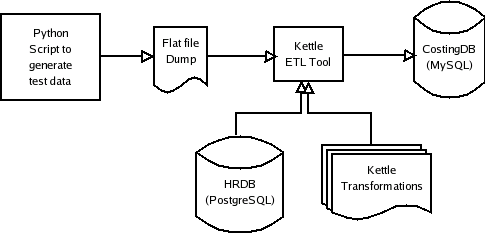
Early in my career, I worked for the MIS group of a factory that manufactured switchboards. It occured to me that one of the processes for generating monthly factory-wide input costs would be a good candidate to convert to Kettle and understand its functionality. Part of the input costs for the factory for the month were the sum of the actual dollar amount paid out to workers. This was governed by the worker's hourly rate and the number of hours worked. The number of hours were derived from the times recorded when the worker signed in and out of the factory. The values are reported by department. The figure below shows the flow.

To replicate the process, I created a flat file for 5 employees in 2 departments (Electrical and Mechanical) which contained in and out times for these employees over a 30 day period. The original databases involved were dBase-IV and Informix with migration scripts written with Clipper and Informix-4GL, the ones in my case study were PostgreSQL and MySQL. A data flow diagram for the Kettle based solution is shown below:

The input file dump looks like this:

1
2
3
4
5
1000015 I 2006-08-01 08:07:00 1154444820
2000024 I 2006-08-01 08:09:00 1154444940
1000015 O 2006-08-01 16:05:00 1154473500
2000024 O 2006-08-01 16:08:00 1154473680
...

The tables involved in the HRDB PostgreSQL table look like this:

 1
 2
 3
 4
 5
 6
 7
 8
 9
10
11
12
13
14
15
16
17
hrdb=> \d employee
              Table "public.employee"
    Column     |          Type          | Modifiers
---------------+------------------------+-----------
 emp_id        | integer                |
 dept_id       | integer                |
 emp_name      | character varying(255) |
 rate_per_hour | numeric(8,2)           |

hrdb=> \d timecard
       Table "public.timecard"
  Column  |     Type      | Modifiers
----------+---------------+-----------
 emp_id   | integer       | not null
 tc_date  | character(10) | not null
 time_in  | integer       |
 time_out | integer       |

And the MySQL table that is populated as a result of the transformations looks like this:

1
2
3
4
5
6
7
mysql> desc input_cost;
+------------+---------------+------+-----+---------+-------+
| Field      | Type          | Null | Key | Default | Extra |
+------------+---------------+------+-----+---------+-------+
| dept_id    | int(11)       |      |     | 0       |       |
| input_cost | decimal(12,2) | YES  |     | NULL    |       |
+------------+---------------+------+-----+---------+-------+

Kettle comes with four main components - Spoon, Pan, Chef and Kitchen. Spoon is a GUI editor for building data transformations. Pan is a command line tool for running a transformation created with Spoon. Chef is a GUI for building up jobs, which are a set of transformations that should work together, and Kitchen is again a command line tool to run jobs built with Chef.

I balked initially at having to use a GUI to design transformations. I would have preferred a scripting language or some sort of XML configuration to do this, but I guess developers have traditionally not been the target market for ETL tools. And I guess the objective of using Kettle is to not do programming for data transformations, and to a certain extent, scripting is programming. Anyway, using Spoon was pretty straightforward, and I was able to generate three transformations which could be applied to my flat file dump in sequence to produce two rows in the CostingDB MySQL table.

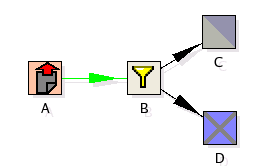
Each Spoon Transformation produces as output a .ktr XML file. It can also write the transformation metadata to a database repository (the recommended option). The first transformation reads the flat file, choosing rows with the "I" flag set (for incoming timecard entry), and inserts it into the HRDB.timecard table. The second transformation reads the flat file a second time, this time choosing rows with the "O" flag set (for outgoing timecard entry) and updates the time_out column in the timecard table. The reason we have two separate transformations instead of having two streams from the filter is because the two streams are going to be multi-threaded and there is no guarantee that an insert would complete before the corresponding update is applied.

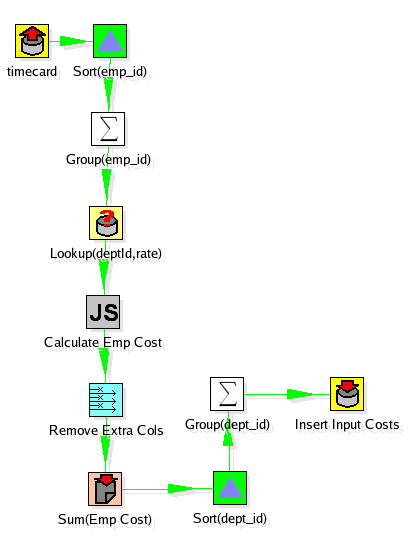
The third transformation reads the HRDB.timecard table, calculates worked hours per employee over the given time period, aggregates the worked hours per employee, applies the employee's per hour rate from the HRDB.employee table to get the dollar value to be paid out, then groups and aggregates the dollar values over department, then inserts the two rows into the MySQL CostingDB table.

You can run the transformations individually through Spoon using the "Run" icon. Alternatively, you can run them through the Pan tool. Here is a Pan script that runs the entire transformation:

1
2
3
4
5
6
7
#!/bin/bash
KETTLE_HOME=/path/to/your/kettle/installation/here
cd $KETTLE_HOME
./pan.sh -file=usr/costing/extract_in_times.ktr 
./pan.sh -file=usr/costing/extract_out_times.ktr
./pan.sh -file=usr/costing/aggregate_worked_hrs.ktr
cd -

Alternatively, you could use Chef GUI Tool to build up this job graphically. Chef offers some other features such as modules which do FTP, send email and so on. The job is shown graphically below, along with the generated .kjb file.

Finally, you can run more than one job, schedule them and so on using Kitchen. Frankly, I dont see much reason to use Chef and Kitchen, since you can just write Pan scripts and schedule them via cron, but I guess the Kettle team put them in there for completeness.

My conclusion is that Spoon is fairly powerful and provides very powerful plumbing to design and run ETL jobs. I still dont like the fact that the only programming interface is a GUI, but I dont have any concrete suggestions for a scripting interface. For those whose needs are not met by the standard components provided by Spoon, there is the Injector component which can be backed by user-supplied Java code, so Kettle also provides a hook for extensibility.