Most dynamic web applications depend on a lot of data stored in databases, and ours is no exception. As the site grows in complexity, our current approach of maintaining the data using SQL is becoming less and less tenable. There are more tables than there were before, and one must understand the relationships before being able to update data. There is a crying need for simple CRUD based application data maintenance tools that operate on a set of one or more tables. However, because of the need to deliver our applications on tight deadlines, we frequently have no time to build these tools, so we end up like the shoemaker's children who have no shoes.
While this may seem like we are saving time by omitting non-essential items in our deliverables schedule, it's actually a really dumb move for several reasons. One, each time you have to add or otherwise maintain your application data, you have to go back and try to understand the data structure and rewrite the SQL to do it. This takes time, so essentially you are paying in time and effort over the life of the project what you would have paid up front...many times over. Two, because the process is manual, you will make mistakes at some point, and some of the mistakes may be catastrophic. Three, without a tool, you are stuck making the updates, since nobody but an engineer is insane enough to consider an SQL editor a long term data maintenance tool. With a web-based tool, if you are lucky, you can pass the work off to the person who needs the data changes in the first place. Even if you are not lucky and you are stuck making the changes yourself, life will still be easier with a tool.
I started working on a little personal project to build a project reporting system couple of weeks ago. It's fully database driven, the application will provide little more than an interface to the database. I had started working on a little framework, inspired by Ruby on Rails (RoR) about 2 years ago, that would generate most of the basic application, but I had shelved it because I did not have much use for it and I was not making much progress. I did consider existing Java based Rails-like frameworks in Java (Sails, Grails), but I decided to build my own because both Sails and Grails are rather large and hard to understand, and use all sorts of cool software which I don't need or care about. They also generate the application into a different structure than I expect. The framework is described in some detail below:
Because there is quite a lot of code (at least more than is possible to show in this blog entry), and there is a chance that I may enhance it in the future, I have applied for a SourceForge project to host the code. If I get it, the project would be called AutoCRUD, and the source code would be available there. Check there about a week from the date of this post.
The code is generated using the information in the database. For that reason, the table and column names must follow certain conventions, so this may be impractical to use for an existing project as is. However, the code is reasonably simple, so it may be possible to make it use a different set of naming conventions that you may follow consistently on your database. The database naming conventions the code depends on are listed below:
- Entities are represented by singular table names, eg. project, person, etc. Table names for tables representing entities must not contain underscores.
- Join tables that join two entities must be named with the two entity names separated by underscore, eg. project_person. These tables will have a single underscore.
- All tables must have an id column. The column data type must resolve to a Java long type. Different databases use different type mappings, for MySQL it is bigint(20). These columns should be defined as auto-incrementing (for MySQL, no other database is supported at the moment). Databases that support sequences (such as Oracle or PostgreSQL) should have an appropriately named sequence, but thats only for future compatibility issues.
- Foreign key reference columns must be named ${entityName}_id where entityName is the table which is being referenced from this table using the foreign key. Again, this does not matter at the moment, but may come up in the future.
So based on the rules above, I start off with the following schema for my database:
1 2 3 4 5 6 7 8 9 10 11 12 13 14 15 16 17 18 19 20 21 22 23 24 25 26 27 28 29 30 31 32 33 34 35 36 37 38 39 40 41 42 43 44 45 46 47 48 49 | create table project (
id bigint(20) unsigned not null auto_increment,
name varchar(32) not null,
description varchar(256) not null,
start_dt timestamp not null,
end_dt timestamp,
primary key(id)
);
create table person (
id bigint(20) unsigned not null auto_increment,
name varchar(32) not null,
primary key(id)
);
create table project_person (
id bigint(20) unsigned not null auto_increment,
project_id bigint(20),
person_id bigint(20),
primary key(id)
);
create unique index ux1_project_person on project_person(project_id, person_id);
alter table project_person
add constraint fk_project foreign key(project_id) references project(id);
alter table project_person
add constraint fk_person foreign key(person_id) references person(id);
create table task (
id bigint(20) unsigned not null auto_increment,
project_id bigint(20) not null,
seq_id varchar(8) not null,
name varchar(64) not null,
est_hrs integer not null,
primary key(id)
);
create unique index ux1_task on task(project_id, seq_id);
alter table task
add constraint fk_project foreign key(project_id) references project(id);
create table hour (
id bigint(20) unsigned not null auto_increment,
task_id bigint(20) not null,
log_date date not null,
act_hrs integer not null,
primary key(id)
);
create unique index ux1_hour on hour(task_id, log_date);
alter table hour
add constraint fk_task foreign key(task_id) references task(id);
|
The following artifacts need to be generated to build the Maven2 Spring web application.
- The web.xml file. This will be in src/main/webapp/WEB-INF and will contain the servlet definition for the Spring DispatcherServlet.
- The Spring application context file (*-servlet.xml). This would live in src/main/webapp/WEB-INF and contain all the ActiveRecord and controller definitions.
- The index.jsp landing page.
- The ActiveRecord subclasses for each individual tables in the schema. These will be packaged under the project package in the beans package.
- The list.jsp, show.jsp and edit.jsp files for each individual table. These will be placed in the src/main/webapp/ directory, each set of three JSP files will be in its own subdirectory that is the table name, eg. src/main/webapp/project/list.jsp.
All the templates for the various files are provided as Velocity .vm files, so they can be changed if you don't like my coding style, indentation, etc. I just show the generated code for a single entity project to keep this blog post to a reasonable size.
The bean subclass for the project entity looks like this. As you can see, internally its just a Map structure. The generation process gives it formal getters and setters which can be accessed from JSTL in the JSPs.
1 2 3 4 5 6 7 8 9 10 11 12 13 14 15 16 17 18 19 20 21 22 23 24 25 26 27 28 29 30 31 32 33 34 35 36 37 38 39 40 41 42 43 | public class Project extends ActiveRecord {
public Project() {
super();
setFields(new String[] {
"name",
"description",
"start_dt",
"end_dt",
"id"
});
setTableName("project");
}
public void setName(String inputValue) {
setValue("name", inputValue);
}
public String getName() {
return (String) getValue("name");
}
public void setDescription(String inputValue) {
setValue("description", inputValue);
}
public String getDescription() {
return (String) getValue("description");
}
public void setStartDt(java.sql.Timestamp inputValue) {
setValue("start_dt", inputValue);
}
public java.sql.Timestamp getStartDt() {
return (java.sql.Timestamp) getValue("start_dt");
}
public void setEndDt(java.sql.Timestamp inputValue) {
setValue("end_dt", inputValue);
}
public java.sql.Timestamp getEndDt() {
return (java.sql.Timestamp) getValue("end_dt");
}
}
|
The code for ActiveRecord is shown below. It provides some methods that will be called from the generated code, and database persistence methods such as save(), delete(), findAll(), findById() and findBy() methods.
1 2 3 4 5 6 7 8 9 10 11 12 13 14 15 16 17 18 19 20 21 22 23 24 25 26 27 28 29 30 31 32 33 34 35 36 37 38 39 40 41 42 43 44 45 46 47 48 49 50 51 52 53 54 55 56 57 58 59 60 61 62 63 64 65 66 67 68 69 70 71 72 73 74 75 76 77 78 79 80 81 82 83 84 85 86 87 88 89 90 91 92 93 94 95 96 97 98 99 100 101 102 103 104 105 106 107 108 109 110 111 112 113 114 115 116 117 118 119 120 121 122 123 124 125 126 127 128 129 130 131 132 133 134 135 136 137 138 139 140 141 142 143 144 145 146 147 148 149 150 151 152 153 154 155 156 157 158 159 160 161 162 163 164 165 166 167 168 169 170 171 172 173 174 175 176 177 178 179 180 181 182 183 184 185 186 187 188 189 190 191 192 193 194 195 196 197 198 199 200 201 | public class ActiveRecord extends JdbcDaoSupport {
private Map<String,Object> fields = new HashMap<String,Object>();
private String tableName;
/**
* Called from within the generated setter methods in subclasses.
* @param fieldName the database field name.
* @param value the value.
*/
public void setValue(String fieldName, Object value) {
fields.put(fieldName, value);
}
/**
* Called from within the generated getter methods in subclasses.
* @param fieldName the database field name.
* @return the value.
*/
public Object getValue(String fieldName) {
return fields.get(fieldName);
}
/**
* Set the database column names. This is set by the generated subclasses
* in their constructor.
* @param fieldNames the database column names.
*/
public void setFields(String[] fieldNames) {
for (String fieldName : fieldNames) {
if (fields.containsKey(fieldName)) {
continue;
}
fields.put(fieldName, null);
}
}
public Set<String> getFields() {
return fields.keySet();
}
/**
* Set the database table name. This is set by the generated subclasses
* in their constructor.
* @param tableName the database table name.
*/
public void setTableName(String tableName) {
this.tableName = tableName;
}
public String getTableName() {
return tableName;
}
public List<ActiveRecord> find(String condition) throws Exception {
if (StringUtils.isBlank(condition)) {
return findAll();
}
Set<String> colNames = fields.keySet();
StringBuilder queryBuilder = new StringBuilder();
queryBuilder.append("select ").
append(StringUtils.join(colNames.iterator(), ',')).
append(" from ").
append(getTableName()).
append(" where ").append(condition);
return getActiveRecords(queryBuilder.toString());
}
public List<ActiveRecord> findAll() throws Exception {
Set<String> colNames = fields.keySet();
StringBuilder queryBuilder = new StringBuilder();
queryBuilder.append("select ").
append(StringUtils.join(colNames.iterator(), ',')).
append(" from ").
append(getTableName());
return getActiveRecords(queryBuilder.toString());
}
public ActiveRecord findById(long id) throws Exception {
List<ActiveRecord> records = find("id=" + id);
if (records.size() == 0) {
return null;
}
if (records.size() > 1) {
throw new Exception(getTableName() + ".id must be a primary key");
}
return records.get(0);
}
public long getId() {
Object oid = fields.get("id");
if (oid == null) {
return 0L;
}
return new Long(oid.toString());
}
public long delete() throws Exception {
StringBuilder queryBuilder = new StringBuilder();
queryBuilder.append("delete from ").
append(getTableName()).
append(" where id=").
append(getId());
getJdbcTemplate().update(queryBuilder.toString());
return getId();
}
public long save() throws Exception {
ActiveRecord dbRecord = findById(getId());
StringBuilder queryBuilder = new StringBuilder();
if (this.equals(dbRecord)) {
// record exists, do update
queryBuilder.append("update ").
append(getTableName()).
append(" set ");
Set<String> colNames = fields.keySet();
Object[] params = new Object[colNames.size() - 1];
int i = 0;
for (String colName : colNames) {
if (colName.equals("id")) {
continue;
}
if (i > 0) {
queryBuilder.append(",");
}
queryBuilder.append(colName).append("=?");
params[i] = fields.get(colName);
i++;
}
queryBuilder.append(" where id=").append(getId());
getJdbcTemplate().update(queryBuilder.toString(), params);
} else {
// record is new, do insert
Set<String> colNames = fields.keySet();
Object[] params = new Object[colNames.size()];
queryBuilder.append("insert into ").append(getTableName()).append("(");
StringBuilder columnListBuilder = new StringBuilder();
StringBuilder placeHolderBuilder = new StringBuilder();
int i = 0;
for (String colName : colNames) {
if (i > 0) {
columnListBuilder.append(",");
placeHolderBuilder.append(",");
}
columnListBuilder.append(colName);
placeHolderBuilder.append("?");
params[i] = fields.get(colName);
i++;
}
queryBuilder.append(columnListBuilder.toString()).
append(")values(").
append(placeHolderBuilder.toString()).
append(")");
getJdbcTemplate().update(queryBuilder.toString(), params);
long id = getJdbcTemplate().queryForLong("select max(id) from " + getTableName());
setValue("id", id);
}
return getId();
}
@Override
public int hashCode() {
return (int) getId();
}
@Override
public boolean equals(Object obj) {
if (!(obj instanceof ActiveRecord)) {
return false;
}
ActiveRecord that = (ActiveRecord) obj;
return (this.getId() == that.getId());
}
protected ActiveRecord newInstance(String className) throws Exception {
Object obj = Class.forName(className).newInstance();
if (obj instanceof ActiveRecord) {
ActiveRecord activeRecord = (ActiveRecord) obj;
activeRecord.setDataSource(getDataSource());
activeRecord.setValue("id", new Long(0L));
return activeRecord;
} else {
throw new Exception("Class:" + className + " must extend ActiveRecord");
}
}
@SuppressWarnings("unchecked")
private List<ActiveRecord> getActiveRecords(String query) throws Exception {
List<Map<String,Object>> rows = getJdbcTemplate().queryForList(query);
List<ActiveRecord> records = new ArrayList<ActiveRecord>();
Set<String> colNames = fields.keySet();
for (Map<String,Object> row : rows) {
ActiveRecord record = newInstance(this.getClass().getName());
for (String colName : colNames) {
record.setValue(colName, row.get(colName));
}
records.add(record);
}
return records;
}
}
|
We wrap the ActiveRecord instance in a transactional proxy, so its save() and delete() operations are transactional. The full bean definition is shown below. The definitions are automatically generated by the scaffold generation code. References to external beans such as dataSource and transactionManager are set up (by the generator) prior to declaring the bean.
1 2 3 4 5 6 7 8 9 10 11 12 13 14 15 | <bean id="project" class="org.springframework.transaction.interceptor.TransactionProxyFactoryBean">
<property name="target">
<bean class="net.sf.prozac.app.beans.Project" scope="prototype">
<property name="dataSource" ref="dataSource"/>
</bean>
</property>
<property name="transactionManager" ref="transactionManager"/>
<property name="proxyTargetClass" value="true"/>
<property name="transactionAttributes">
<props>
<prop key="*">PROPAGATION_REQUIRED,-Exception</prop>
<prop key="find*">PROPAGATION_SUPPORTS</prop>
</props>
</property>
</bean>
|
Sample usage of the Project ActiveRecord is shown from my JUnit test below. The usage is slightly less natural than if you had used a separate DAO for this bean, but it is not really hard to follow:
1 2 3 4 5 6 7 8 9 10 11 12 13 14 15 16 17 | Project project = (Project) context.getBean("project");
project.setName("Rocket Launcher");
project.setDescription("A test project to do rocket launching");
project.setStartDt(new Timestamp(System.currentTimeMillis()));
project.setEndDt(new Timestamp(System.currentTimeMillis()));
long id = project.save();
logger.debug("project.id=" + id);
List<ActiveRecord> projects = project.findAll();
for (ActiveRecord record : projects) {
Project p1 = (Project) record;
logger.debug("project.id=" + p1.getId());
logger.debug("project.name=" + p1.getName());
logger.debug("project.description=" + p1.getDescription());
logger.debug("project.startDt=" + p1.getStartDt());
logger.debug("project.endDt=" + p1.getEndDt());
p1.delete();
}
|
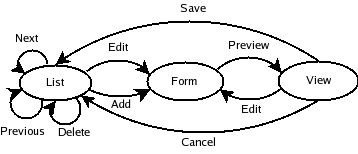
The ActiveController is a standard Spring MultiActionController which enforces the navigation logic. It uses a ParameterMethodName resolver, and the initial and default action is the list view. The action parameter determines which method is invoked. The code for the ActiveController is shown below:
1 2 3 4 5 6 7 8 9 10 11 12 13 14 15 16 17 18 19 20 21 22 23 24 25 26 27 28 29 30 31 32 33 34 35 36 37 38 39 40 41 42 43 44 45 46 47 48 49 50 51 52 53 54 55 56 57 58 59 60 61 62 63 64 65 66 67 68 69 70 71 72 73 74 75 76 77 78 79 80 81 82 83 84 85 86 | public class ActiveController extends MultiActionController {
private ActiveRecord activeRecord;
private String tableName;
public void setActiveRecord(ActiveRecord activeRecord) {
this.activeRecord = activeRecord;
}
public void setTableName(String tableName) {
this.tableName = tableName;
}
public ModelAndView list(HttpServletRequest request, HttpServletResponse response) throws Exception {
List<ActiveRecord> records = activeRecord.findAll();
ModelAndView mav = new ModelAndView();
mav.addObject("records", records);
mav.addObject("fields", activeRecord.getFields());
mav.setViewName(StringUtils.join(new String[] {tableName, "list"}, '/'));
return mav;
}
public ModelAndView add(HttpServletRequest request, HttpServletResponse response) throws Exception {
Set<String> fieldNames = activeRecord.getFields();
ActiveRecord record = activeRecord.newInstance(activeRecord.getClass().getName());
ModelAndView mav = new ModelAndView();
mav.addObject("record", record);
mav.setViewName(StringUtils.join(new String[] {tableName, "edit"}, '/'));
return mav;
}
public ModelAndView edit(HttpServletRequest request, HttpServletResponse response) throws Exception {
long id = ServletRequestUtils.getRequiredLongParameter(request, "id");
ActiveRecord record = activeRecord.findById(id);
ModelAndView mav = new ModelAndView();
mav.addObject("record", record);
mav.setViewName(StringUtils.join(new String[] {tableName, "edit"}, '/'));
return mav;
}
public ModelAndView save(HttpServletRequest request, HttpServletResponse response) throws Exception {
Set<String> fieldNames = activeRecord.getFields();
ActiveRecord record = activeRecord.newInstance(activeRecord.getClass().getName());
for (String fieldName : fieldNames) {
String value = ServletRequestUtils.getStringParameter(request, fieldName);
record.setValue(fieldName, value);
}
record.save();
return list(request, response);
}
public ModelAndView remove(HttpServletRequest request, HttpServletResponse response) throws Exception {
long id = ServletRequestUtils.getRequiredLongParameter(request, "id");
ActiveRecord record = activeRecord.findById(id);
record.delete();
return list(request, response);
}
public ModelAndView show(HttpServletRequest request, HttpServletResponse response) throws Exception {
long id = ServletRequestUtils.getRequiredLongParameter(request, "id");
ActiveRecord record = activeRecord.findById(id);
ModelAndView mav = new ModelAndView();
mav.addObject("record", record);
mav.addObject("fields", activeRecord.getFields());
mav.setViewName(StringUtils.join(new String[] {tableName, "show"}, '/'));
return mav;
}
public ModelAndView search(HttpServletRequest request, HttpServletResponse response) throws Exception {
StringBuilder conditionBuilder = new StringBuilder();
Set<String> fieldNames = activeRecord.getFields();
for (String fieldName : fieldNames) {
String value = ServletRequestUtils.getStringParameter(request, fieldName);
if (StringUtils.isBlank(value)) {
continue;
}
conditionBuilder.append(fieldName + "='" + value + "'");
}
List<ActiveRecord> records = activeRecord.find(conditionBuilder.toString());
ModelAndView mav = new ModelAndView();
mav.addObject("records", records);
mav.addObject("fields", activeRecord.getFields());
mav.setViewName(StringUtils.join(new String[] {tableName, "list"}, '/'));
return mav;
}
}
|
Currently, each ActiveRecord controller instance uses the ActiveController directly, although in keeping with RoR style, these should be empty subclasses which the user can override if desired. Here is the bean configuration for the projectController:
1 2 3 4 5 6 7 8 9 | <bean id="projectController" class="net.sf.prozac.framework.ActiveController">
<property name="activeRecord" ref="project"/>
<property name="tableName" value="project"/>
<property name="methodNameResolver">
<bean class="org.springframework.web.servlet.mvc.multiaction.ParameterMethodNameResolver">
<property name="defaultMethodName" value="list"/>
</bean>
</property>
</bean>
|
The three JSPs that are generated per table (or entity bean) are the list.jsp, edit.jsp and the show.jsp files. They live in their own subdirectory, named after the table, in the src/main/webapp directory. They are shown below:
1 2 3 4 5 6 7 8 9 10 11 12 13 14 15 16 17 18 19 20 21 22 23 24 25 26 27 28 29 30 31 32 33 34 35 36 37 38 39 40 41 42 43 44 45 46 47 48 49 50 51 52 53 54 55 56 57 58 59 60 61 62 63 64 65 66 67 68 69 70 71 72 73 74 75 76 77 78 79 80 81 82 83 84 85 86 87 88 89 90 91 92 93 94 95 96 97 98 99 100 101 102 103 104 105 106 107 108 109 110 111 112 113 114 115 | <!-- project/list.jsp -->
<%@ page language="java" contentType="text/html; charset=UTF-8" pageEncoding="UTF-8"%>
<%@ taglib uri="http://java.sun.com/jsp/jstl/core" prefix="c" %>
<%@ taglib uri="http://java.sun.com/jsp/jstl/functions" prefix="fn" %>
<%@ taglib uri="http://java.sun.com/jsp/jstl/fmt" prefix="fmt" %>
<!DOCTYPE html PUBLIC "-//W3C//DTD HTML 4.01 Transitional//EN" "http://www.w3.org/TR/html4/loose.dtd">
<html>
<head>
<meta http-equiv="Content-Type" content="text/html; charset=UTF-8">
<title>project:list</title>
</head>
<body>
<h1>project:list</h1>
<table cellspacing="0" cellpadding="0" border="1" width="100%">
<tr>
<th>name</th>
<th>description</th>
<th>start_dt</th>
<th>end_dt</th>
<th>View</th>
</tr>
<c:forEach items="${records}" var="record">
<tr>
<td>${record.name}</td>
<td>${record.description}</td>
<td>${record.startDt}</td>
<td>${record.endDt}</td>
<td><a href="/prozac/project.do?action=show&id=${record.id}">View</a></td>
</tr>
</c:forEach>
</table>
<br/>
<a href="/prozac/project.do?action=add">Add</a>
</body>
</html>
<!-- project/edit.jsp -->
<%@ page language="java" contentType="text/html; charset=UTF-8" pageEncoding="UTF-8"%>
<%@ taglib uri="http://java.sun.com/jsp/jstl/core" prefix="c" %>
<%@ taglib uri="http://java.sun.com/jsp/jstl/functions" prefix="fn" %>
<%@ taglib uri="http://java.sun.com/jsp/jstl/fmt" prefix="fmt" %>
<!DOCTYPE html PUBLIC "-//W3C//DTD HTML 4.01 Transitional//EN" "http://www.w3.org/TR/html4/loose.dtd">
<html>
<head>
<meta http-equiv="Content-Type" content="text/html; charset=UTF-8">
<title>project:edit</title>
</head>
<body>
<h1>project:edit</h1>
<form name="edit" action="/prozac/project.do" method="post">
<input type="hidden" name="action" value="save"/>
<input type="hidden" name="id" value="${record.id}"/>
<table cellspacing="0" cellpadding="0" border="0" width="100%">
<tr>
<td><b>name</b></td>
<td><input type="text" name="name" value="${record.name}"/></td>
</tr>
<tr>
<td><b>description</b></td>
<td><input type="text" name="description" value="${record.description}"/></td>
</tr>
<tr>
<td><b>start_dt</b></td>
<td><input type="text" name="startDt" value="${record.startDt}"/></td>
</tr>
<tr>
<td><b>end_dt</b></td>
<td><input type="text" name="endDt" value="${record.endDt}"/></td>
</tr>
</table>
<input type="submit" name="submit" value="Submit"/>
<input type="button" name="cancel" value="Cancel" onclick="javascript:window.location='/prozac/project.do?action=list'"/>
</form>
</body>
</html>
<!-- project/show.jsp -->
<%@ page language="java" contentType="text/html; charset=UTF-8" pageEncoding="UTF-8"%>
<%@ taglib uri="http://java.sun.com/jsp/jstl/core" prefix="c" %>
<%@ taglib uri="http://java.sun.com/jsp/jstl/functions" prefix="fn" %>
<%@ taglib uri="http://java.sun.com/jsp/jstl/fmt" prefix="fmt" %>
<!DOCTYPE html PUBLIC "-//W3C//DTD HTML 4.01 Transitional//EN" "http://www.w3.org/TR/html4/loose.dtd">
<html>
<head>
<meta http-equiv="Content-Type" content="text/html; charset=UTF-8">
<title>project:show</title>
</head>
<body>
<h1>project:show</h1>
<table cellspacing="0" cellpadding="0" border="0" width="100%">
<tr>
<td><b>name</b></td>
<td>${record.name}</td>
</tr>
<tr>
<td><b>description</b></td>
<td>${record.description}</td>
</tr>
<tr>
<td><b>start_dt</b></td>
<td>${record.startDt}</td>
</tr>
<tr>
<td><b>end_dt</b></td>
<td>${record.endDt}</td>
</tr>
</table>
<input type="button" name="edit" value="Edit" onclick="javascript:window.location='/prozac/project.do?action=edit&id=${record.id}'"/>
<input type="button" name="delete" value="Delete" onclick="javascript:window.location='/prozac/project.do?action=remove&id=${record.id}'"/>
<input type="button" name="cancel" value="Cancel" onclick="javascript:window.location='/prozac/project.do?action=list'"/>
</body>
</html>
|
The generated files can be run right away without any editing, but admittedly the pages are not very pretty. At this point, it is fairly easy to just manually prettify it up. Alternatively, if we standardize on how the pages should look, and what widgets should be used for particular column data types, we could modify the velocity template files to produce this. So after generating all the files, I fire up Jetty using Maven's jetty6:run goal and point to localhost:8080/prozac (my application name).

|
Application Index Page |

|
Project Lists Page (no entries currently). Click Add link to add a project. |

|
Add Project Page. Cancel will send you back to list page, Submit will add the record and send you back to the list page (below). |

|
Project List page with a single entry. Click on the View link to see the single project record. |

|
Project view page. Click on Edit to edit the contents, delete to delete the contents and cancel to do nothing and return to the list. We select edit. |

|
Project Edit page. We change the description and click the Submit button. |

|
The Project List page with the change applied. |
There are quite a few things that can be improved with this framework. First off, it works only against the MySQL database, which is the database I have on my laptop at the moment. I will need to make it work with Oracle if I want to use this at work. The other major improvement is in the use of appropriate widgets for various data types. I am not an expert on that end, so I guess I will have to get someone who is good at that to take a look there. Yet another thing I want to work on is to be able to specify associations, which both RoR and the Java RoR-like frameworks allow but AutoCRUD does not.
Update (July 15, 2007): I have uploaded the code described in the blog to the AutoCRUD project on Sourceforge.